11th Dec '24
/
0 comments

Filtering posts by a group field’s subfield value with Meta Box when using a custom table in Bricks

In the comments section of Filtering posts by a group field’s true / false field sub field value with ACF or Meta Box in Bricks tutorial, a member asks:

Do you have a tutorial for how true/false works in a custom database table with metabox?

I use custom database table for faster queries.

Make a select field and and two options YES and NO.

then go to settings tab in the custom field area in metabox and...

enable > "save data in a custom table"enable > "include table prefix"enable > "create table automatically"

Then fill in custom table > "my_product_details"Then fill in custom prefix > "my_prefix_".

Then in bricks go query products and go add add below in meta query:key > mb_product_product_detail_latest_productvalue > 1

"mb_product" references to metabox product post type.Then "product_detail_" is the table prefix.Then "latest_product" is the field ID.

But whatever I do, it doesn't query.

I tried without mb_product. With brackets around it. Nothing works.

This Pro tutorial provides the steps to filter the posts of a Bricks query loop to output only those with the value of a Select subfield of a Group field set to Yes when using a custom table in Meta Box.

Consider this scenario:

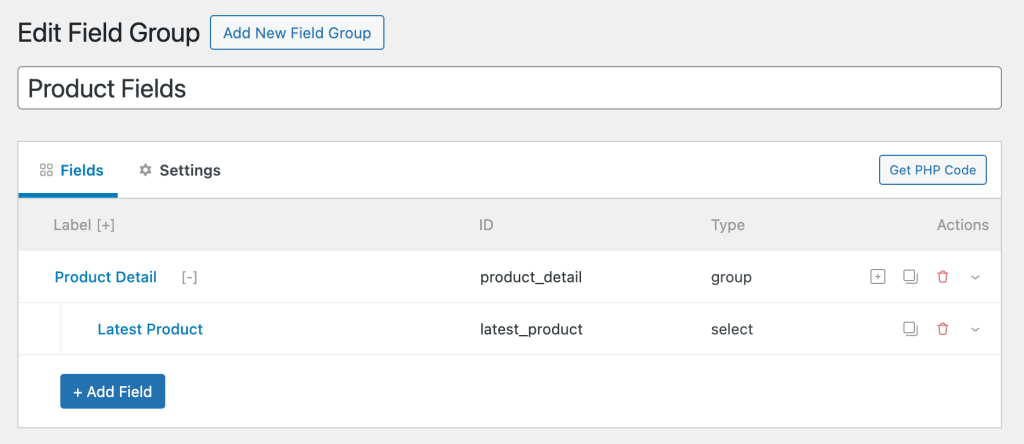
Field Group name: Product Fields

Settings: Location is Post type = Product (product)

Product Detail (group type field)|__Latest Product (select type field with Yes and No choices. You may want to set Placeholder to -- Select --)
In the Settings tab:

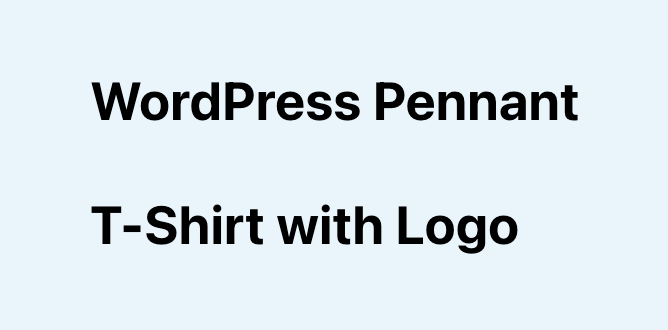
For products titled "WordPress Pennant" and "T-Shirt with Logo":

For other products either the value is set to No or not set.

After implementing the tutorial, output of a query loop:
Step 1

[optional] If you want to output the value of the 'Latest Product' select subfield on single products, add this in a Code element:

This is a BricksLabs Pro tutorial.

For full access login below or create your BricksLabs Pro account

Get access to all 633 Bricks code tutorials with BricksLabs Pro

Related Tutorials..

Pro
Parent post Bricks query loop

Parent post Bricks query loop

Updated on 5 Feb 2024 In the BricksLabs Facebook group a user asks: Is there a way to output the data of a parent post…
Categories:
Querying Posts by Date Field to Exclude Past Events with ACPT Plugin

Querying Posts by Date Field to Exclude Past Events with ACPT Plugin

In the Bricks' Facebook group, a user asked: Meta query? What am I missing?Hi all, really need a little guidance on this one. I have…
Categories:
Pro
6 Random Featured Posts in Alphabetical Order in Bricks

6 Random Featured Posts in Alphabetical Order in Bricks

How to output x number of random posts with a specific meta value set, in Alphabetical order.
Categories:
Pro
How to Insert an Ad or an Element Between Posts in Bricks

How to Insert an Ad or an Element Between Posts in Bricks

How to insert an image or any Bricks element between posts output by a query loop.
Categories:
Tags:
Pro
Posts Grouped by Years and Months in Bricks

Posts Grouped by Years and Months in Bricks

How display posts organized by months & within years based on the published date.
Categories:
Pro
“My Favorites” in Bricks

“My Favorites” in Bricks

This Pro tutorial provides the steps to set up and use My Favorites in Bricks Builder.
Categories:
Pro
Upcoming Events Grouped by ‘Month Year’ in Bricks

Upcoming Events Grouped by ‘Month Year’ in Bricks

A custom query loop type for showing future events based on a date custom field using three nested query loops.
Pro
Dynamic Horizontal Posts Accordion in Bricks

Dynamic Horizontal Posts Accordion in Bricks

Creating a horizontal accordion of featured images from posts output by Bricks' query loop.
Categories:
Tags: