27th Jun '22
/
10 comments

Horizontal Scrolling Sections in Bricks Using GSAP’s ScrollTrigger

Horizontal Scrolling Sections in Bricks Using GSAP’s ScrollTrigger

In this Pro tutorial we'll use GSAP's ScrollTrigger library in Bricks to create a section that will scroll horizontally across a number of full width containers as the user scrolls down the page. This can be used on multiple sections on a page.

For the tutorial, we'll use Bricks' Query Loop feature to fetch a few posts with the container element and have these as the content that is inside the horizontal scrolling section. The effect is turned off for <992px (tablet portraight), where the posts are then stacked instead, this can be easily changed.

Demo

Page Export

An export file of the demo page is provided at the end.

Creating the Structure in Bricks

The demo page has a fairly simple structure, consisting of just three main sections. The top and bottom sections are just regular sections (container element) to show where other content would be on the page and can be ignored. The second section is where all of the horizontal scrolling is implemented. This is our horizontal scroll container, which we'll give the class 'horizontal-scroll-container' so we can apply some CSS later.

If we were creating two horizontal scrolling sections on the same page, we'd just create the same structure for that section and give it the same 'horizontal-scroll-container' class.
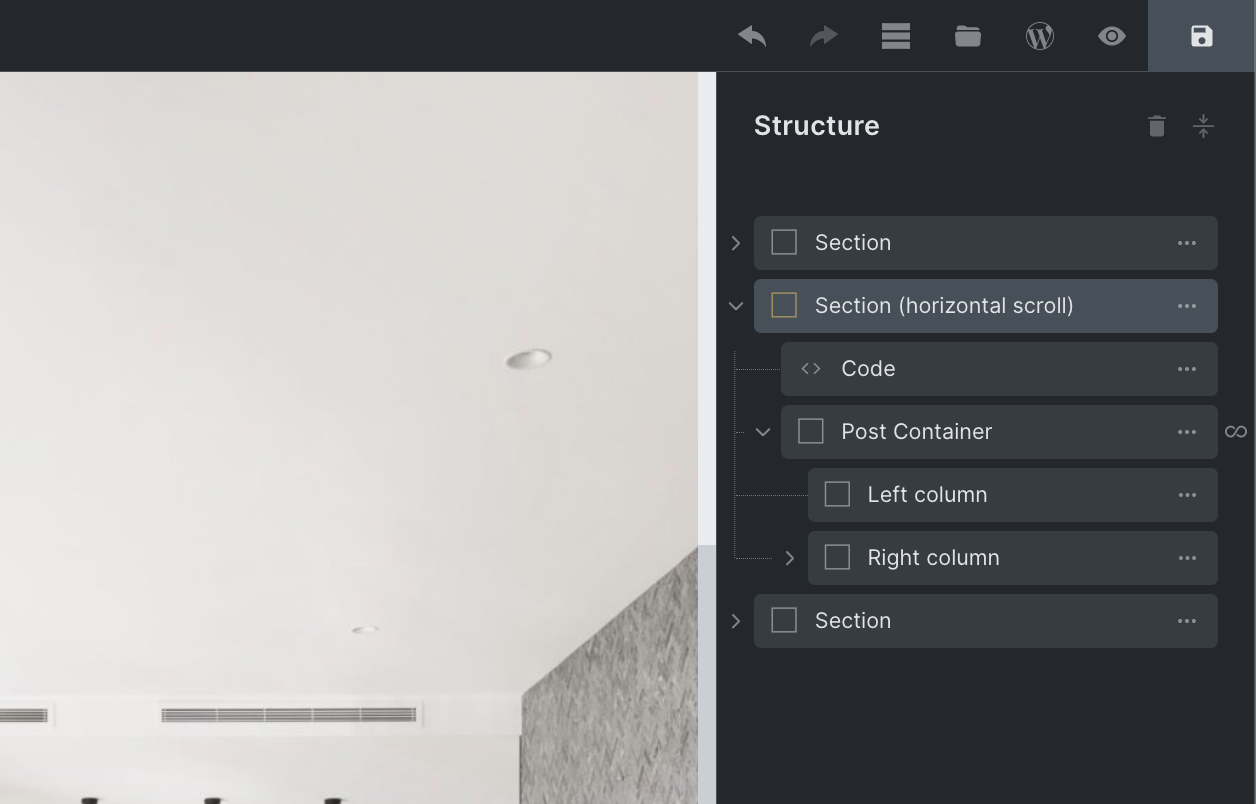
We can see from the structure, there's only one container inside of the horizontal scroll section, our 'post container'. This is being duplicated by the Query Loop feature to output three posts. If we weren't using the Query loop, we'd just add more containers manually inside of the section and add in the content.

This is a BricksLabs Pro tutorial.

For full access login below or create your BricksLabs Pro account

Get access to all 633 Bricks code tutorials with BricksLabs Pro

Related Tutorials..

Download Area with HappyFiles

Download Area with HappyFiles

Aside from the series I'm currently writing on how to create custom galleries and sliders with HappyFiles, Metabox and Bricks, I have developed a snippet…
Categories:
Pro
Codrops Dynamic Shape Overlay in Bricks

Codrops Dynamic Shape Overlay in Bricks

This Pro tutorial provides the steps to implement Codrops' SVG shape overlay in Bricks. We shall display a WordPress menu in the overlay after an…
Categories:
Pro
Image Banner as Query Loop Posts Grid’s Last Item in Bricks

Image Banner as Query Loop Posts Grid’s Last Item in Bricks

In the comments section of How to Insert Element(s) Between Query Loop Posts in Bricks tutorial, a site member asked: This is fantastic! Is there…
Categories:
Tags:
How to create filters with IsotopeJS in Bricks (Part 3): apply multiple filters

How to create filters with IsotopeJS in Bricks (Part 3): apply multiple filters

This tutorial will review how to apply multiple filters to an isotope container using the IsotopeJS library‘s features in Bricks.
Pro
Bricks Query Loop Cards with Hover Image

Bricks Query Loop Cards with Hover Image

How images uploaded to posts can appear when the featured images in a Bricks posts query loop are hovered.
Categories:
Pro
Sticky Header Only For Visitors in Bricks

Sticky Header Only For Visitors in Bricks

A user asked: Anyone know if its possible to make the sticky of the header conditional only for logged out users? This Pro tutorial shows…
Categories:
How to add SVG icon as list item bullets

How to add SVG icon as list item bullets

Add this sample CSS: Replace brxe-list with the class of your ul element. Here's how you can generate the value of background-image property: Copy your…
Categories:
Tags:
Introduction to GSAP in Bricks

Introduction to GSAP in Bricks

In this tutorial, we'll learn how to run basic GSAP animations inside the Bricks Builder using JSON objects inside specific data-attributes. Introduction Not everyone like…
Categories: