12th Sep '22
/
0 comments

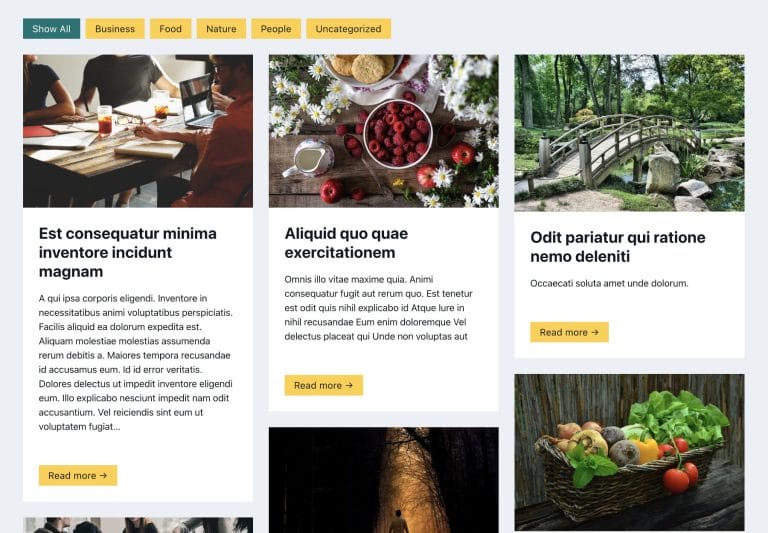
Add masonry style to the Remote Template list

This article will show you how to transform the remote templates list of Bricks in a masonry style without cropping your images – it will allow you to see the entire template’s image before importing it.

Table of Contents

Preview

Before

old_remote_templates

After

masonry_remote_templates

CSS

Custom CSS for the editor interface can be entered in Bricks → Settings → Builder → Builder Mode: Custom → Save Settings → Builder Mode (Custom) text area.

/* Masonry Template View */
#bricks-popup ul.bricks-layout-wrapper{
    column-count: 1;
    display: block;
    gap: 0;
}
#bricks-popup li.bricks-layout-item {
    width: 100% !important;
    break-inside: avoid;
}
#bricks-popup .bricks-layout-item-inner.has-img {
    height: 100% !important;
    min-height: 200px;
}
#bricks-popup.templates img {
    height: 100% !important;
}
@media screen and (min-width: 768px){
    #bricks-popup ul.bricks-layout-wrapper {
        column-count: 2;
    }
}
@media screen and (min-width: 1200px){
    #bricks-popup ul.bricks-layout-wrapper {
        column-count: 3;
    }
}
Get access to all 610 Bricks code tutorials with BricksLabs Pro

Leave the first comment


Related Tutorials..

How to Change Bricks Preloader Background Color

How to Change Bricks Preloader Background Color

Working on a dark-themed site like our friend Storm and getting blinded by the light background of Bricks' preloader screen of the editor? Here's how…
Categories:
A CSS approach to content switcher in Bricks

A CSS approach to content switcher in Bricks

In this tutorial, we'll build a 100% CSS solution for content toggles in Bricks. Introduction If you are looking for an integrated solution in Bricks…
Categories:
Tags:
Width and Height of Mobile Hamburger Toggle in Bricks

Width and Height of Mobile Hamburger Toggle in Bricks

Looking to change the size of Bricks hamburger toggle in the mobile menu? The default width value of 20px can be changed by selecting the…
Categories:
Pro
Masonry for Query Loop in Bricks

Masonry for Query Loop in Bricks

If you are looking to implement masonry with a 'view more' button i.e., click-type of infinite scroll follow this tutorial instead. Updated on 15 Mar…
Categories:
Pro
Dynamic Horizontal Posts Accordion in Bricks

Dynamic Horizontal Posts Accordion in Bricks

Creating a horizontal accordion of featured images from posts output by Bricks' query loop.
Categories:
Tags:
Animated Border Hover Effect Buttons

Animated Border Hover Effect Buttons

Here's how can be implemented in HTML/WordPress/Bricks. Step 1 Add this CSS in your child theme's style.css or another appropriate location: Step 2 Add a…
Categories:
How to Create a Right Overflow Effect on Sliders in Bricks

How to Create a Right Overflow Effect on Sliders in Bricks

In this tutorial, we'll learn how to recreate a nice overflow effect on the right of our sliders in Bricks. Introduction Recently, I've been asked…
Categories:
Pro
Slow Zoom Effect for Slides in Bricks

Slow Zoom Effect for Slides in Bricks

This Pro tutorial provides the steps to set up a slow zoom effect for slides of nestable slider element in Bricks. Step 1 Add a…
Categories:
Tags:
Pro
CSS Grid for Posts Element in Bricks

CSS Grid for Posts Element in Bricks

The "Posts" element in Bricks has "Grid" as the default layout but the actual CSS it applies on the page feels hacky with negative margins…
Categories: