19th Mar '24
/
6 comments

CPT Posts Grouped by Custom Taxonomy Terms in Bricks

A user asked via email:

I need some help with querying custom taxonomies in Bricks and I hope you could help me with that.

I have CPT created with Metabox called Services. I also created a custom taxonomy called Service Category.

I want to create a query that will first show all of the terms, and then inside this query there should be one more query, that will be querying through the services from this particular taxonomy.

Everything is working apart from the second inner query, I cannot get it to filter and show only services that are part of this current particular query, it is always showing all services, and I do not know how to solve this problem.

To give you some more context, here's the link showcasing how it should look like, I'm currently building it as a static page, as I did not find any other solution:

This Pro tutorial provides the steps to set up an outer Service Category terms loop and an inner Service posts loop in Bricks without writing a single line of code.
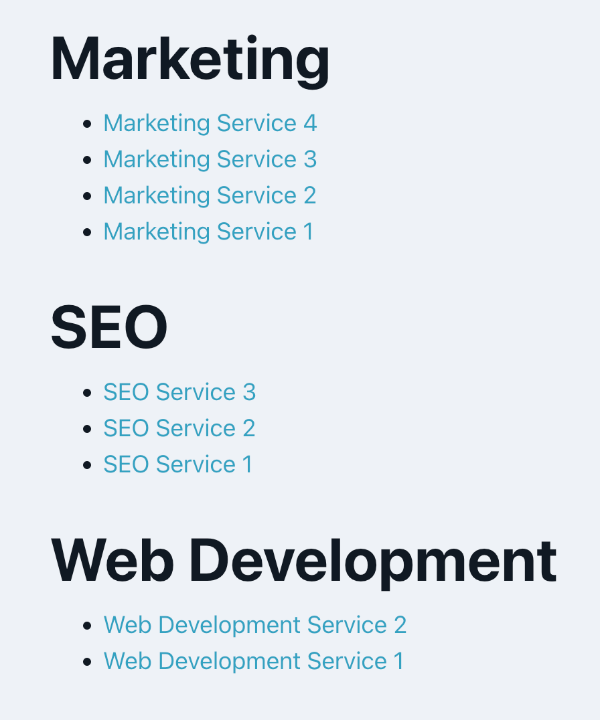
This works with posts of any post type and terms of any taxonomy incl. categories.

Step 1

Register your CPT and the associated custom taxonomy using Meta Box or ACF or CPT UI or otherwise.

CPT:

Custom Taxonomy:

Resave permalinks.

Step 2

Add posts of your CPT and select the corresponding terms for each.

Step 3

Create a template called say "Services" of the type Archive.

Edit it with Bricks.

Add a template condition to make it apply to your CPT archive page.

Copy the below JSON code and paste to import a Section having this structure:

This is a BricksLabs Pro tutorial.

For full access login below or create your BricksLabs Pro account

Get access to all 612 Bricks code tutorials with BricksLabs Pro

Related Tutorials..

Pro
Dynamic Horizontal Posts Accordion in Bricks

Dynamic Horizontal Posts Accordion in Bricks

Creating a horizontal accordion of featured images from posts output by Bricks' query loop.
Categories:
Tags:
Pro
Posts Grouped by Month and Year in Bricks

Posts Grouped by Month and Year in Bricks

Nesting query loops with months & years in descending order, with the inner loop outputting the posts.
Categories:
Pro
Hierarchical Posts with Nested Query Loops in Bricks

Hierarchical Posts with Nested Query Loops in Bricks

Learn how to set up nested query loops in Bricks to show hierarchical posts with child posts grouped under their corresponding parent posts
Categories:
Pro
Query Loop in Bricks

Query Loop in Bricks

This Pro tutorial walks you through the steps to use the Query Loop feature in Bricks to display a responsive grid of posts using CSS…
Categories:
Pro
Querying Posts by ACF Date Sub Field in Bricks

Querying Posts by ACF Date Sub Field in Bricks

Updated on 17 Nov 2023. This Pro tutorial shows how we can set post__in query parameter of a query loop in Bricks to an array…
Categories:
Tags:
Pro
Posts Grouped by Post Dates in Bricks

Posts Grouped by Post Dates in Bricks

Setting up query loops for “Post Dates” with an the inner loop displaying all posts published on that day.
Categories:
Pro
Current Single Post Reference From Inside a Bricks Query Loop

Current Single Post Reference From Inside a Bricks Query Loop

Use case: Get the single post’s custom field (like ACF Repeater or Meta Box Group) array row corresponding to the loop’s counter/index
Categories:
How to Show Future Events in Bricks

How to Show Future Events in Bricks

One of the common requirements in WordPress is being able to filter the events (or could be posts of any post type) to only those…
Categories: