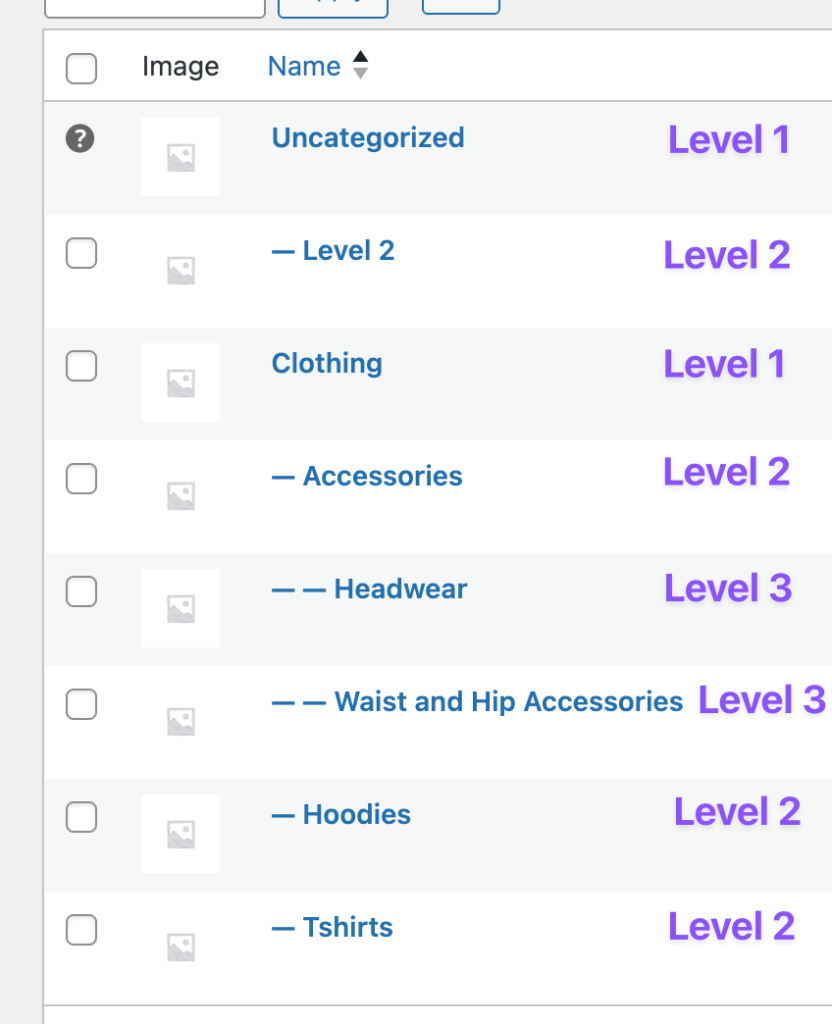
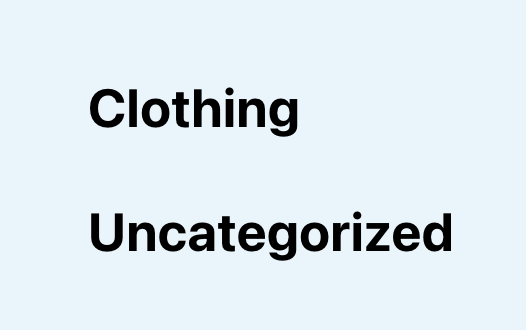
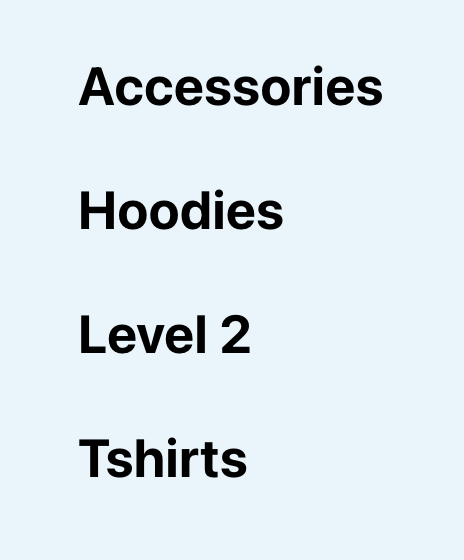
27th Jun '25/0 commentsHow to Query WordPress Taxonomy Terms by Hierarchy Level in BricksSridhar Katakam This Pro tutorial provides the steps to limit the terms of a Bricks Terms query to only those at a specific level within the taxonomy hierarchy. Consider this WooCommerce product categories hierarchy: After implementing the tutorial we can output all terms in level 1 or 2 or 3 etc. Terms in level 1 (note this is also possible w/o any custom code): Terms in level 2: Terms in level 3: Step 1 Add the following in child theme's functions.php (w/o the opening PHP tag) or a code snippets plugin: This is a BricksLabs Pro tutorial. For full access login below or create your BricksLabs Pro account Username Password Remember Me Forgot Password Tagged: BricksProTerms QuerySridhar KatakamSridhar Katakam is a Bricks enthusiast. He likes helping others by researching and solving WordPress-related problems and building websites.Get access to all 610 Bricks code tutorials with BricksLabs Pro

Latest Featured Posts First in Bricks Query Loop (No Duplicates)In the Bricks Facebook group a user asks: We can use AI to help unfreeze our brains sometimes or at least have it write the…Read more →Categories: Bricks, FreeTags: Query Loop
Pro WordPress Posts using WP REST API in BricksThe steps to display posts from any WordPress site that has WP REST API enabled in Bricks builder using a custom query type.Read more →Categories: Bricks, ProTags: Custom Query Type
Querying Posts by Date Field to Exclude Past Events with ACPT PluginIn the Bricks' Facebook group, a user asked: Meta query? What am I missing?Hi all, really need a little guidance on this one. I have…Read more →Categories: Bricks, Free, PluginsTags: ACPT, Query Loop
Pro 6 Random Featured Posts in Alphabetical Order in BricksHow to output x number of random posts with a specific meta value set, in Alphabetical order.Read more →Categories: Bricks, ProTags: Query Loop
Pro Related Posts by Taxonomy in BricksIn the previous Posts Related by Current Post's Terms in Bricks tutorial, we showed how posts related to the current single post that have the…Read more →Categories: Bricks, ProTags: Query Loop, Related Posts
Pro Remove Duplicate Term Names From Bricks Terms Query LoopExcluding terms with duplicate names, keeping the first occurrence & excluding subsequent terms with the same name.Read more →Categories: Bricks, ProTags: bricks/terms/query_vars, Terms Query
Bricks Query Loop – Posts Authored by Logged in UserHow to display only the posts authored by the currently logged-in user in a query loop.Read more →Categories: Bricks, FreeTags: Query Loop
How to populate a map with dynamic markers from a CPT using ACF in Bricks (PART 3)This tutorial provides the PHP & JS codes that can be pasted in order to filter your markers on a map each time you digit…Read more →Categories: Bricks, Free, PluginsTags: ACF, Animations, Filters, Isotope, Leaflet, Maps, Query Loop
Pro How to Insert Element(s) Between Query Loop Posts in BricksUpdate on 16 Aug 2023: Follow this tutorial instead. This Pro tutorial shows how we can insert a Div (or any custom HTML) after nth…Read more →Categories: Bricks, ProTags: Conditions, Dynamic Data, Query Loop