Opens in a new tab
12th Sep '22
/
0 comments

Add masonry style to the Remote Template list

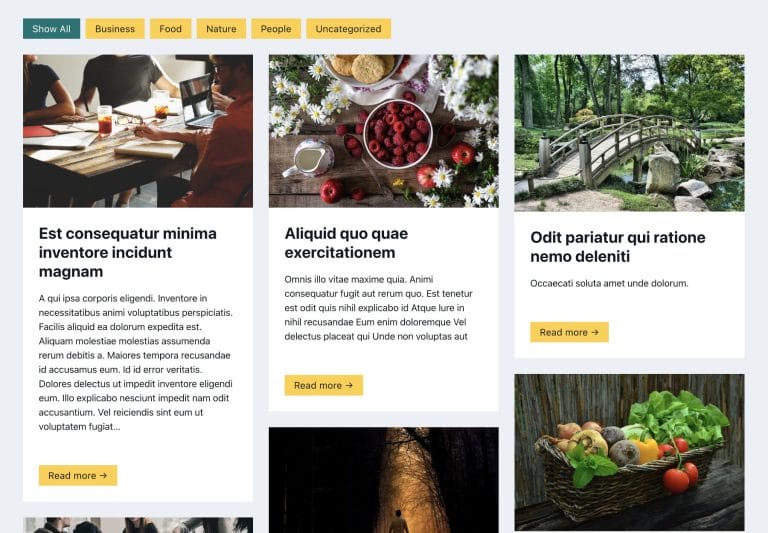
This article will show you how to transform the remote templates list of Bricks in a masonry style without cropping your images – it will allow you to see the entire template’s image before importing it.

Preview

Before

old_remote_templates

After

masonry_remote_templates

CSS

Custom CSS for the editor interface can be entered in Bricks → Settings → Builder → Builder Mode: Custom → Save Settings → Builder Mode (Custom) text area.

/* Masonry Template View */
#bricks-popup ul.bricks-layout-wrapper{
    column-count: 1;
    display: block;
    gap: 0;
}
#bricks-popup li.bricks-layout-item {
    width: 100% !important;
    break-inside: avoid;
}
#bricks-popup .bricks-layout-item-inner.has-img {
    height: 100% !important;
    min-height: 200px;
}
#bricks-popup.templates img {
    height: 100% !important;
}
@media screen and (min-width: 768px){
    #bricks-popup ul.bricks-layout-wrapper {
        column-count: 2;
    }
}
@media screen and (min-width: 1200px){
    #bricks-popup ul.bricks-layout-wrapper {
        column-count: 3;
    }
}
Get access to all 633 Bricks code tutorials with BricksLabs Pro

Leave the first comment


Related Tutorials..

Pro
CSS Grid for Posts Element in Bricks

CSS Grid for Posts Element in Bricks

The "Posts" element in Bricks has "Grid" as the default layout but the actual CSS it applies on the page feels hacky with negative margins…
Categories:
Pro
Masonry + Click-type Infinite Scroll in Bricks

Masonry + Click-type Infinite Scroll in Bricks

This Pro tutorial provides the steps to lay out posts in a masonry style with a View More button, which, when clicked, loads the next…
Categories:
Pro
Custom Posts Grid Layout in Bricks using CSS Grid

Custom Posts Grid Layout in Bricks using CSS Grid

There are at least three ways in which we can build custom loops in Bricks. Posts elementTurning on Query Loop on a containerCode element While…
Categories:
Pro
Filtering Masonry-layout Posts by Categories in Bricks using Isotope

Filtering Masonry-layout Posts by Categories in Bricks using Isotope

Step by step on how to use Isotope in Bricks for filtering posts by categories.
Categories:
Pro
Slow Zoom Effect for Slides in Bricks

Slow Zoom Effect for Slides in Bricks

This Pro tutorial provides the steps to set up a slow zoom effect for slides of nestable slider element in Bricks. Step 1 Add a…
Categories:
Tags:
How to Change Bricks Preloader Background Color

How to Change Bricks Preloader Background Color

Working on a dark-themed site like our friend Storm and getting blinded by the light background of Bricks' preloader screen of the editor? Here's how…
Categories:
How to Create a Right Overflow Effect on Sliders in Bricks

How to Create a Right Overflow Effect on Sliders in Bricks

In this tutorial, we'll learn how to recreate a nice overflow effect on the right of our sliders in Bricks. Introduction Recently, I've been asked…
Categories:
How to create a dynamic infinite logo slider with ACF and Bricks

How to create a dynamic infinite logo slider with ACF and Bricks

This tutorial provides the builder settings, PHP & CSS codes that can be pasted in order to create an infinite logo slider in pure CSS…