10th Apr '25
/
0 comments

Check if a given category has at least one post

There could be situations where you want to check if a given category (by its slug) has at least 1 post assigned to that category.

This tutorial shows how we can define a custom function for this and use it with Bricks‘ dynamic data condition.

After implementing this tutorial you should be able to do something like
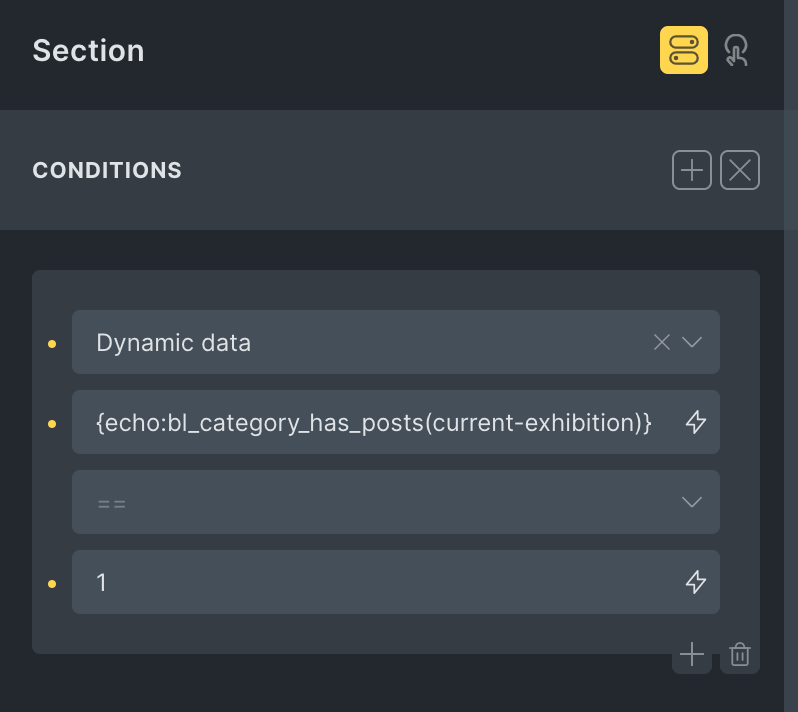
where current-exhibition is the slug of the category. With that in place, the Section will not be output if there is no post assigned to the Current Exhibition category.

Step 1

Add the following in child theme‘s functions.php (w/o the opening PHP tag) or a code snippets plugin:

<?php

/**
 * Check if a category has at least one published post.
 *
 * @param string $category_slug The slug of the category to check.
 * @return bool True if the category has at least one published post, false otherwise.
 */
function bl_category_has_posts( string $category_slug ): bool {
  // Get the category object by slug
  $category = get_term_by( 'slug', $category_slug, 'category' );
  
  // If category doesn't exist, return false
  if ( ! $category || is_wp_error( $category ) ) return false;
  
  // The count property contains the number of published posts in this category
  return $category->count > 0;
}

Step 2

Whitelist the bl_category_has_posts function.

Ex.:

<?php 

add_filter( 'bricks/code/echo_function_names', function() {
  return [
    'bl_category_has_posts'
  ];
} );

You should also add other functions (native or custom) being used in your Bricks instance besides bl_category_has_posts. This can be checked at Bricks → Settings → Custom code by clicking the Code review button.

More info on whitelisting can be found here.

Step 3

Add a dynamic data condition on any element in the Bricks builder which should be output if a specific category contains a post.

{echo:bl_category_has_posts(current-exhibition)}

Replace current-exhibition with the slug of category you want to check for.

Get access to all 632 Bricks code tutorials with BricksLabs Pro

Leave the first comment


Related Tutorials..

Pro
City-based and Country-based Conditional Output in Bricks

City-based and Country-based Conditional Output in Bricks

This Pro tutorial provides the steps to render a Bricks element only if the visitor is from the specified country or city. Note: Caching may…
Categories:
Pro
Checking if the current Page/Post has Children i.e. is a Parent in Bricks

Checking if the current Page/Post has Children i.e. is a Parent in Bricks

Shows how we can check whether the current Page or Post (of any hierarchical post type) is a parent
Categories:
Pro
Conditional Rendering of ACF Repeater Rows Based on True / False Sub Field in Bricks

Conditional Rendering of ACF Repeater Rows Based on True / False Sub Field in Bricks

This Pro tutorial provides the steps to modify a ACF Repeater query loop to only output the rows for which a True / False type…
Categories:
Checking if Repeater/Cloneable Meta Fields Are Empty in Bricks

Checking if Repeater/Cloneable Meta Fields Are Empty in Bricks

Creating a condition to ensure that a section only gets output if at least one row of data is filled in.
Categories:
Pro
Conditional CSS Classes based on Bricks Query Count

Conditional CSS Classes based on Bricks Query Count

In a Bricks project I am currently working on, there are nested query loops - team members inside departments on a Page. Each team member…
Pro
Condition for checking Bricks content

Condition for checking Bricks content

Only outputting Bricks content when a Page is built with Bricks, otherwise display WP content.
Categories:
Pro
Check If The Latest Post Was Published in The Last X Minutes

Check If The Latest Post Was Published in The Last X Minutes

In this Pro tutorial we shall define a custom function that takes in the number of minutes as an argument and returns true if there…
Categories:
Conditions in Bricks Builder

Conditions in Bricks Builder

The current version of Bricks does not have a built-in Conditions feature but that does not mean we can't set them up manually with custom…
Categories:
Conditional Output on the First Page of Archives in Bricks

Conditional Output on the First Page of Archives in Bricks

How to output an element on an archive page only if we're on the first page of the archive.
Categories: