4th Feb '25
/
2 comments

Meta Box Relationship Posts Filtered by a Taxonomy Term in Bricks

Updated on 17 Feb 2025

In the Inner Circle a user asks:

Hello,

I have a relationship made in metabox between two Post Types “Travel” AND “Programs”

When I am in post Type “Travel”, I want to query the relationship, so I only see the “Program” posts, filtered by a term=”long-travel” of a taxonomy “travel-types”

I think ACF has something to do this, but in Meta Box i dont know. May be I have to design a personlized query in bricks.?

Thank you

This Pro tutorial for Bricks users provides the steps to output posts (of Program CPT) related to the current single post (of Travel CPT) filtered to only those that have a specific taxomomy (program-type) term (long-travel) where the relationship is set up via Meta Box.

In other words, show only long travel programs related to the current travel entry.

Step 1

Install and active Meta Box and Meta Box AIO.

Create travel and program CPTs.

Add program-type taxonomy for the program CPT.

Populate the taxonomy with terms like 'Short Trip', 'Long Travel' as needed.

Populate the CPTs with some sample posts.

Step 2

Add a new Relationship.

Note the auto-generated ID of the relationship. In this case, it'd be travel-program.

Step 3

Edit all the posts of any of the two post types and set up the connected/related posts of the other post type.

Sample travel post:

In the above example, 'ArtVo Tour' program's program type is set to 'Short Trips'.

'Great Ocean Road Drive' program's program type is set to 'Long Travel'.

After implementing the tutorial, only 'Great Ocean Road Drive' will appear as the related program for Melbourne travel post since we are going to limit the related programs to only those that are termed 'Long Travel'.

Step 4

Create a template titled say 'Travel' of type 'Single'.

Edit it with Bricks.

Add a condition to apply the template to all single posts of Travel CPT.
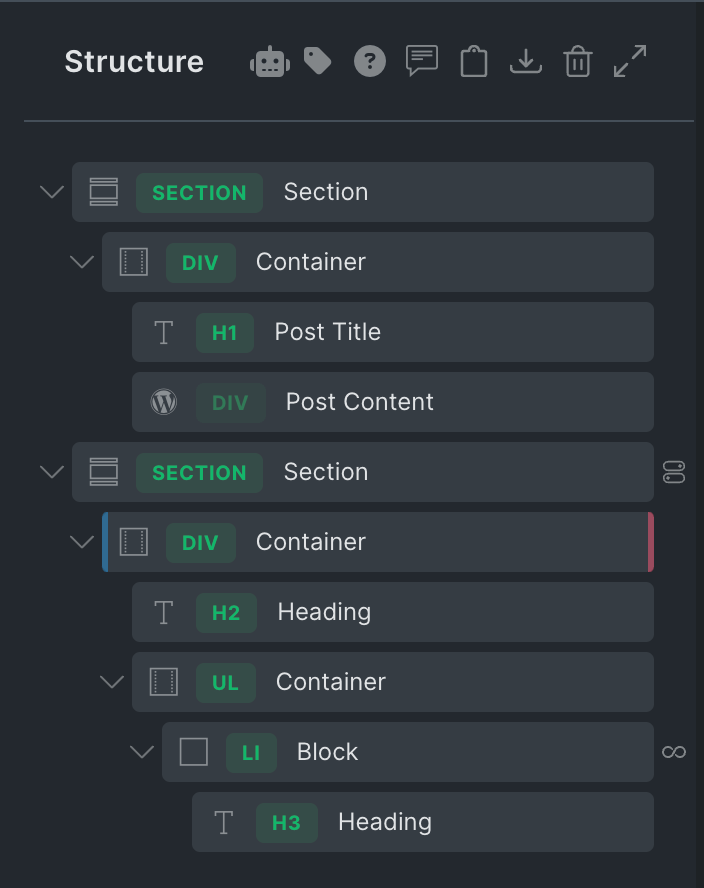
Add a Section showing the post title and content.

Add another Section and inside its Container, a Block.

Enable query loop on the Block and paste:

This is a BricksLabs Pro tutorial.

For full access login below or create your BricksLabs Pro account

Get access to all 610 Bricks code tutorials with BricksLabs Pro

Related Tutorials..

Pro
Filtering Bricks Query Loop By Meta Box Relationship

Filtering Bricks Query Loop By Meta Box Relationship

In the Bricks Facebook group a user asks: Consider this setup: CPTs: Service Areas and City Pages Meta Box Relationship: City Pages to Service Areas…
Categories:
Pods Relationship Field in Bricks

Pods Relationship Field in Bricks

In this Pro tutorial, we explore the Relationship field of Pods and share ways to output items of a related post type incl. the associated…
Categories:
Pro
ACF Relationship: Show all other events related to the artists of the current event

ACF Relationship: Show all other events related to the artists of the current event

How all other events related to the artists of the current event can be output in a Bricks query loop.
Categories:
Pro
Custom Meta Box Thumbnail Slider in WordPress

Custom Meta Box Thumbnail Slider in WordPress

This Pro tutorial provides the steps to set up an image and YouTube video thumbnail slider in WordPress using Splide and Meta Box. The site…
Categories:
Tags:
Pro
HappyFiles Folder Images via Meta Box Taxonomy Field in Bricks Image Gallery

HappyFiles Folder Images via Meta Box Taxonomy Field in Bricks Image Gallery

How to set the source of Bricks’ Image Gallery element on a post to images in the selected HappyFiles Folder(s) via a Meta Box Taxonomy…
Pro
Filtering Meta Box Cloneable Group by Select Subfield for Multiple Bricks Query Loops with Conditional Output

Filtering Meta Box Cloneable Group by Select Subfield for Multiple Bricks Query Loops with Conditional Output

In the Bricks Facebook group a user asks: Consider this cloneable Meta Box field group for a Custom Post Type called Tour: with the Tour…