23rd Mar '23
/
0 comments

Month and Day Condition in Bricks

Month and Day Condition in Bricks

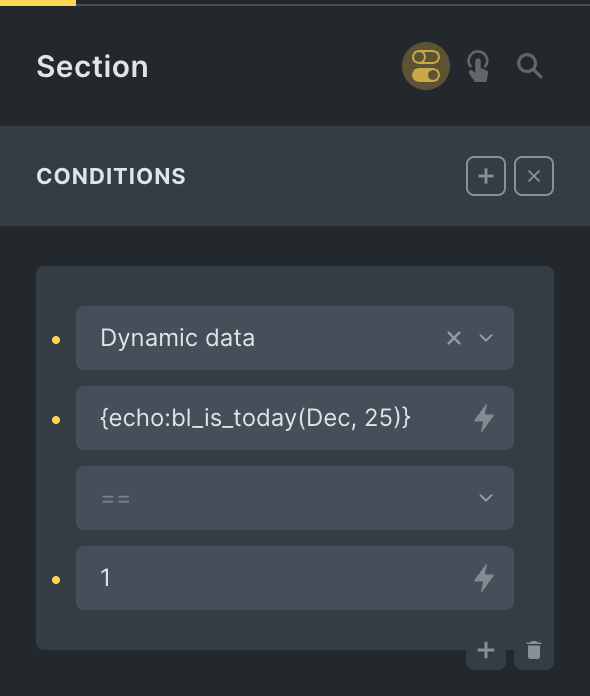
This Pro tutorial shows how we can define a custom function that takes in a month in the three-letter format (like Dec) and a day number (like 25) and use it with Dynamic data condition of Bricks to output or not output elements on specific month and day whilst taking the site's timezone setting into account.

Use case: Render a banner only on special days/holidays every year automatically. Ex.: on Christmas day.

Step 1

Add this in child theme's functions.php or a code snippets plugin:

This is a BricksLabs Pro tutorial.

For full access login below or create your BricksLabs Pro account

Get access to all 627 Bricks code tutorials with BricksLabs Pro

Related Tutorials..

Checking if the current post has been published within the last x days

Checking if the current post has been published within the last x days

Conditionally output an element if the current post has been published in the last x number of days.
Categories:
Pro
“Pro” Category Ribbon for Posts in Bricks

“Pro” Category Ribbon for Posts in Bricks

This Pro tutorial provides the steps to show a "Pro" ribbon for posts that are categorized under the "Pro" category when using Bricks builder. Step…
Categories:
Pro
Conditional Section when Post has a Featured Image in Bricks

Conditional Section when Post has a Featured Image in Bricks

This Pro tutorial provides the steps to output a Section in Bricks on single posts (of any post type) only if the post has a…
Categories:
Pro
Conditional CSS in Bricks based on Post Meta

Conditional CSS in Bricks based on Post Meta

In the Bricks Facebook group a user asked: Hi, how do you normally control margin, padding and font-size using dynamic data? I'm looking for the…
Pro
Conditional single post Bricks template based on internal referrer URL

Conditional single post Bricks template based on internal referrer URL

How to automatically select a single post template depending on the page from which the post is accessed.
Pro
Custom Dynamic Data Tags for ACF Field Label, Prefix and Suffix in Bricks

Custom Dynamic Data Tags for ACF Field Label, Prefix and Suffix in Bricks

Bricks lacks built-in dynamic tags for ACF field labels, prefixes, and suffixes. This tutorial shows how to add them using custom dynamic tags.
Categories:
[Function] Current Term Has Children

[Function] Current Term Has Children

Updated on 20 Jul 2024 A user asks: I'm working on an archive template for WooCommerce products. I'm trying to hide a section if there…
Pro
Conditional Rendering in Bricks Based on CSS Class

Conditional Rendering in Bricks Based on CSS Class

Updated on 19 Jun 2024 A user asks: Is there a way to apply the same conditions to several elements like we set styles appending…
Categories: