Weekday Condition in BricksAs of Bricks 1.7, the built-in "Weekday" condition does not work correctly. This is most likely due to it not taking the site's timezone (set…Read more →Categories: Bricks, FreeTags: Conditions, Dynamic Data
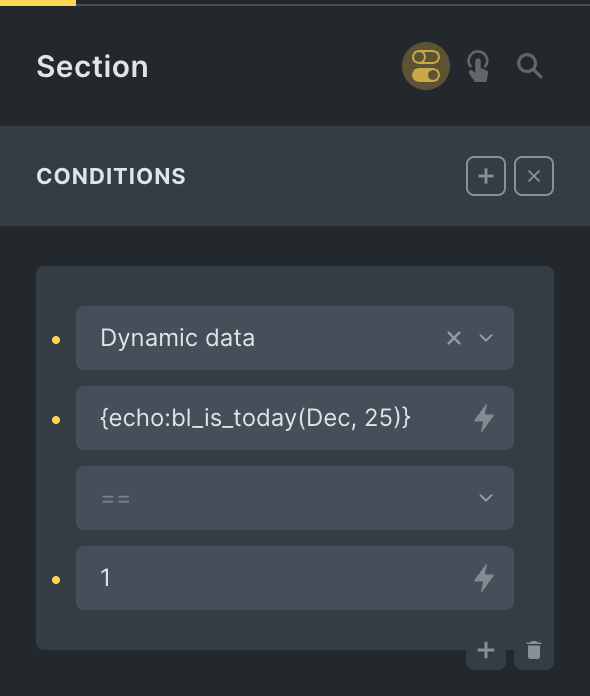
Pro Month and Day Condition in BricksThis Pro tutorial shows how we can define a custom function that takes in a month in the three-letter format (like Dec) and a day…Read more →Categories: Bricks, ProTags: Conditions, Dynamic Data
Is WooCommerce Cart Empty Condition in BricksUpdated on 5 Nov 2024 Looking to conditionally render an element depending on whether the user's cart is empty or not when using WooCommerce? Add…Read more →Categories: Bricks, Free, Plugins, WordPressTags: Conditions, WooCommerce
Bricks Condition for WishList MemberHow to render a Bricks element only if the user has access to a specified WishList Member level.Read more →Categories: Bricks, Free, PluginsTags: Conditions
Pro How to Insert Element(s) Between Query Loop Posts in BricksUpdate on 16 Aug 2023: Follow this tutorial instead. This Pro tutorial shows how we can insert a Div (or any custom HTML) after nth…Read more →Categories: Bricks, ProTags: Conditions, Dynamic Data, Query Loop
Pro Check if the User Purchased Any of the Specified ProductsThis Pro tutorial provides the steps for setting up a dynamic data condition on any element in Bricks so it can be output only if…Read more →Categories: Bricks, Plugins, ProTags: Conditions, Dynamic Data, WooCommerce
Pro Posts Related by Taxonomy in BricksIt is a common requirement to show posts (posts/CPT items) that belong to the same taxonomy (category/tag/custom taxonomy) as the current single post. This Pro…Read more →Categories: Bricks, ProTags: bricks/element/settings, bricks/posts/query_vars, Conditions, Filters
Checking for ACF Repeater Rows in BricksUpdated on 13 Feb 2025 Bricks enables us to conditionally output elements if a ACF field of basic type like Text has value by selecting…Read more →Categories: Bricks, Free, PluginsTags: ACF, ACF Repeater, Conditions, Dynamic Data
Pro MemberPress in BricksThis tutorial aims to be a useful resource for using MemberPress in Bricks sites.Read more →Categories: Bricks, Plugins, ProTags: Conditions, Filters, MemberPress
Pro Check If The Latest Post Was Published in The Last X MinutesIn this Pro tutorial we shall define a custom function that takes in the number of minutes as an argument and returns true if there…Read more →Categories: Bricks, ProTags: Conditions
[Function] Current Term Has ChildrenUpdated on 20 Jul 2024 A user asks: I'm working on an archive template for WooCommerce products. I'm trying to hide a section if there…Read more →Categories: Bricks, FreeTags: Conditions, get_term_children
Pro Meta Box Relationship in BricksUpdated on 19 Mar 2024 In BricksLabs' Facebook group a user asks: I have a Product (Metabox CPT) that is connected to a Creator (Metabox…Read more →Categories: Bricks, Plugins, ProTags: Conditions, Dynamic Data, Meta Box, Relationship



![[Function] Current Term Has Children](https://brickslabs.com/wp-content/uploads/2022/11/product-category-template-bricks-768x286.png)
