
Updated on 25 Jun 2025
In Reddit a user asks:
Template conditional logic to exclude pages with a particular taxonomy term?
I can’t figure out if it’s possible, I have two single post templates for a CPT with a custom taxonomy. I’d like to use one for the majority, and the second for posts that have a specific term in the taxonomy. The template conditions allow you to exclude a term (my term shows up) but it ignores that exclusion when rendering a page. It seems the “Term” template condition only applies to archives of that term, not a single post with that term. How can I do that?
I tried googling it but everything I’ve seen talks about archive pages and not single pages with a term.
Update
This can be done using the built-in template condition settings of Bricks w/o writing code.
Create your term-specific single template, edit it with Bricks and
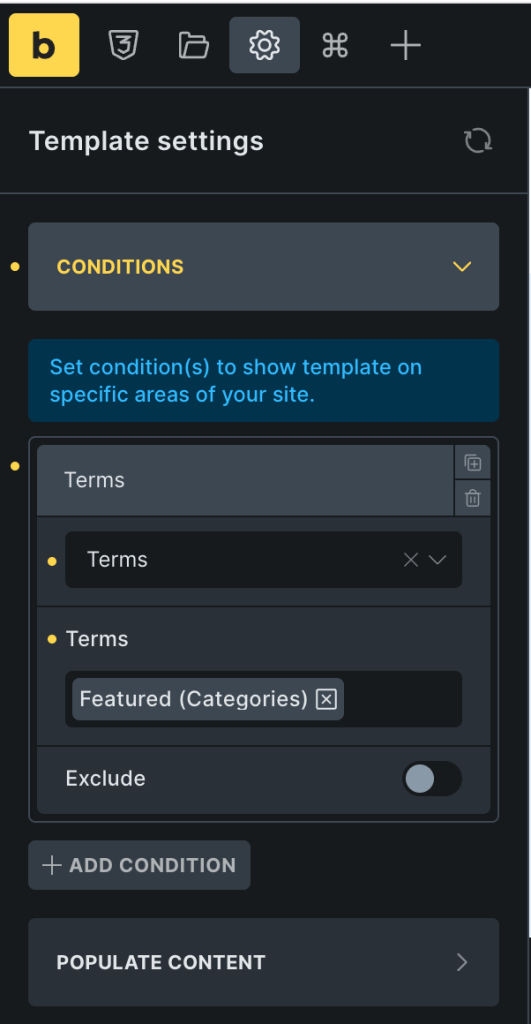
Bricks has an amazing filter called bricks/active_templates that enable us to programmatically assign templates to different types of content.
Let’s say you have a Bricks template named “Single Post” of type Single that’s set to apply to all posts and now you have a special category called “Featured” and you want that any post that is assigned to this category be rendered using a different Bricks template named say, “Single Post in Featured Category”.
This can be done using the bricks/active_templates filter like so.
Add the following in child theme‘s functions.php (w/o the opening PHP tag) or a code snippets plugin:
add_filter( 'bricks/active_templates', function( $active_templates, $post_id ) {
  // Check if we're on a single post
  if ( is_singular( 'post' ) ) {
    // Get the current post object
    $post = get_post( $post_id );

    // Check if the post has a specific term
    if ( has_term( 'featured', 'category', $post ) ) {
      // Replace 92 with your template ID
      $active_templates['content'] = 92;
    }
  }

  return $active_templates;
}, 10, 2 );
where
postinif ( is_singular( 'post' ) ) {is the post typefeaturedis the slug of the category/taxonomy termcategoryis the taxonomy92is the ID of your “Single Post in Featured Category” Bricks template


