24th Jun '25
/
0 comments

Dynamic Post Galleries in Lightboxes using BricksExtras

A user asks:

So I managed to build a pop-up that contains some frame slider elements in it.

I’m using jet engine and created a gallery custom field .

I’ll share screenshots shortly but I’m trying to figure out how to display the gallery part .

Has anyone used jet engine, frames and bricks pop-up to show a dynamic popup from a cpt items.

This tutorial provides the steps to show post-specific galleries as sliders using BricksExtras when a “Open Gallery” link is clicked in post cards in a posts grid.

Step 1

Set up a gallery for your post type using a plugin like ACF or Meta Box or JetEngine.

We used JetEngine in our test site for this article.

Step 2

Install BricksExtras and enable these elements:

  • Dynamic Lightbox
  • Pro Slider
  • Pro Slider Control (optional – if you want to have the freedom to place controls like prev/next, progress bar anywhere in the lightbox)

Edit your page/template with Bricks and set up the structure so it looks like this:

Section JSON so you can copy and paste (uses ACSS utility classes).

Image element has been set to show the featured image.

Note

Ensure that the URL has been set for the Text link/Button element that opens the lightbox. You may want to set it to #.

Set a dynamic data condition to make the Open Gallery Link be output only if the gallery for the post in the loop is not empty.

Dynamic Lightbox config:

Set the Link selector to the class of the Open Gallery Link.

For Pro Slider, set Nav arrows to None and enable Gallery mode (under GALLERY control group).

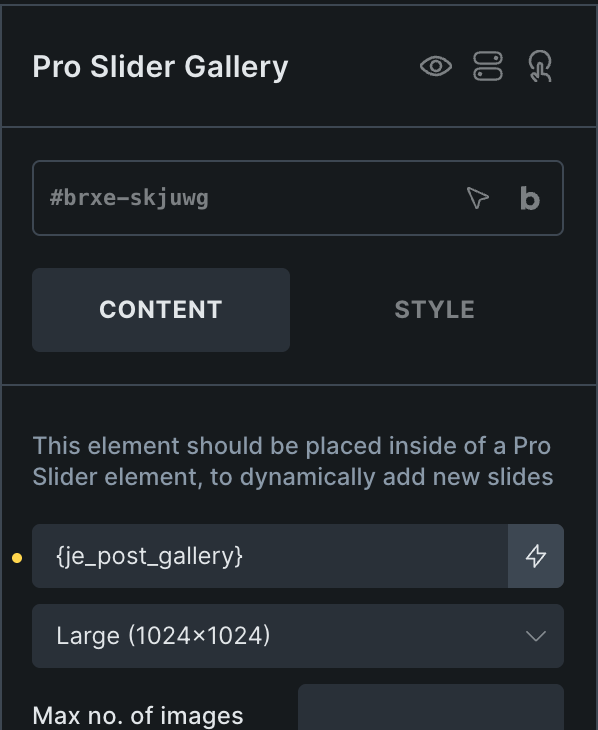
For the Pro Slider Gallery element, select your gallery’s custom field.
Select left and right icons in the Pro Slider Control elements.

Get access to all 633 Bricks code tutorials with BricksLabs Pro

Leave the first comment


Related Tutorials..

Synced thumbnail sliders in Bricks using BricksExtras

Synced thumbnail sliders in Bricks using BricksExtras

Setting up post-specific synced/linked thumbnail sliders that show photos from a gallery-type custom field using BricksExtras plugin in Bricks.
Pro
Bricks Slider Images From ACF Flexible Content Sub Field

Bricks Slider Images From ACF Flexible Content Sub Field

Consider the following field group associated with Pages when using ACF Pro: "Page Fields" field group|_"Page Content" Flexible Content field|__"Layout 1" layout|___"Title" Text field|___"Layout 1…
Populating WS Form Field in a Modal with Button Data Attribute in Bricks

Populating WS Form Field in a Modal with Button Data Attribute in Bricks

How a WS Form field inside of a Modal can be pre-filled by clicking the button to open it.
Categories:
Random Post Inside Modal using BricksExtras

Random Post Inside Modal using BricksExtras

In the BricksLabs Facebook group a user asks: So I have a modal, that opens with a random post title and content from a custom…
Categories:
Pro
Custom Meta Box Thumbnail Slider in WordPress

Custom Meta Box Thumbnail Slider in WordPress

This Pro tutorial provides the steps to set up an image and YouTube video thumbnail slider in WordPress using Splide and Meta Box. The site…
Categories:
Tags:
How to Create a Progress Bar for the Nested Slider in Bricks

How to Create a Progress Bar for the Nested Slider in Bricks

In this tutorial, we'll learn how to add a progress bar to our nested slider element in Bricks. Introduction A user recently asked in the…
Categories: