23rd Mar '23
/
0 comments

Month and Day Condition in Bricks

Month and Day Condition in Bricks

This Pro tutorial shows how we can define a custom function that takes in a month in the three-letter format (like Dec) and a day number (like 25) and use it with Dynamic data condition of Bricks to output or not output elements on specific month and day whilst taking the site's timezone setting into account.

Use case: Render a banner only on special days/holidays every year automatically. Ex.: on Christmas day.

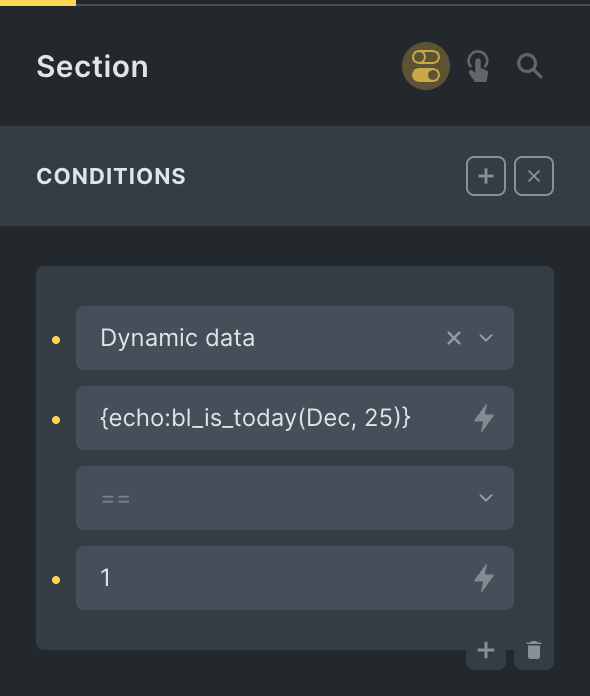
Step 1

Add this in child theme's functions.php or a code snippets plugin:

This is a BricksLabs Pro tutorial.

For full access login below or create your BricksLabs Pro account

Get access to all 633 Bricks code tutorials with BricksLabs Pro

Related Tutorials..

Pro
Check If The Latest Post Was Published in The Last X Minutes

Check If The Latest Post Was Published in The Last X Minutes

In this Pro tutorial we shall define a custom function that takes in the number of minutes as an argument and returns true if there…
Categories:
Pro
City-based and Country-based Conditional Output in Bricks

City-based and Country-based Conditional Output in Bricks

This Pro tutorial provides the steps to render a Bricks element only if the visitor is from the specified country or city. Note: Caching may…
Categories:
Pro
Custom Dynamic Data Tags for ACF Field Label, Prefix and Suffix in Bricks

Custom Dynamic Data Tags for ACF Field Label, Prefix and Suffix in Bricks

Bricks lacks built-in dynamic tags for ACF field labels, prefixes, and suffixes. This tutorial shows how to add them using custom dynamic tags.
Categories:
Pro
Conditional Section when Post has a Featured Image in Bricks

Conditional Section when Post has a Featured Image in Bricks

This Pro tutorial provides the steps to output a Section in Bricks on single posts (of any post type) only if the post has a…
Categories:
Pro
ACF Repeater sub field value dynamic data condition in Bricks

ACF Repeater sub field value dynamic data condition in Bricks

This Pro tutorial provides the steps to output an element on single posts (can be of any post type) only if a specified ACF (Pro)…
Checking for Post Type in Bricks

Checking for Post Type in Bricks

A way to output elements conditionally based on the current post type in the loop in Bricks.
Categories:
Checking if the current post has been published within the last x days

Checking if the current post has been published within the last x days

Conditionally output an element if the current post has been published in the last x number of days.
Categories: