
Plugins like ACF, Meta Box and JetEngine enable us to register custom meta for posts in WordPress that are repeating/cloneable. Ex.: A Technology field that has say, Technology Name and Technology Age sub fields.
There could be times when you want an element say, a Bricks Section that contains such repeater fields to be rendered only if there is at least one row in the field i.e., if the field is populated with at least 1 set of sub field values.

We can create a custom function that returns the count of array items and use this with the Dynamic data condition in Bricks to ensure that the Section gets output only if at least one row of data is filled in.
Add this in child theme‘s functions.php or a code snippets plugin:
function bl_get_repeater_count( $field_name ) {
	return count( get_post_meta( get_the_ID(), $field_name ) );
}

add_filter( 'bricks/code/echo_function_names', function() {
  return [
    'bl_get_repeater_count',
  ];
} );
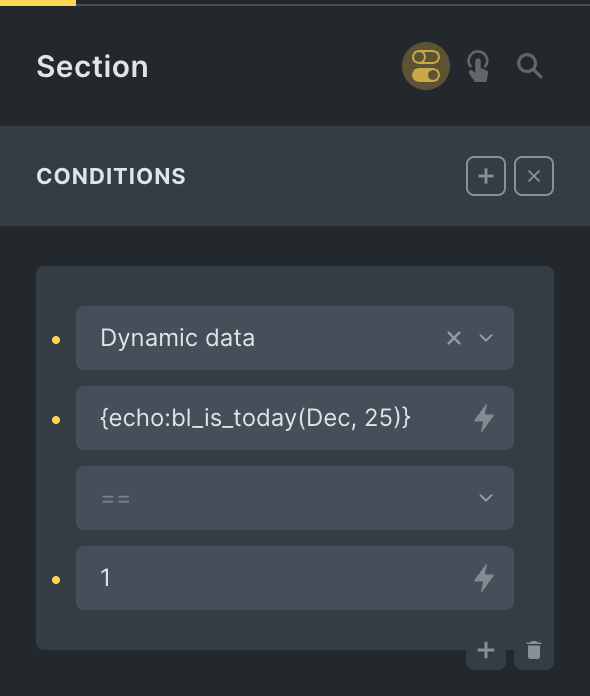
and apply a condition like this:

{echo:bl_get_repeater_count(technologies)}
Replace technologies with the name/ID of your repeating custom field.





![[Function] Current Term Has Children](https://brickslabs.com/wp-content/uploads/2022/11/product-category-template-bricks-768x286.png)
16 comments
Domenico
Hey Sridhar, thanks for sharing this solution. I tried to implement it but I am not getting the condition to work. I have copy/pasted the php code into a snippet. Set the condition on my div to show it only if my repeater (JetEngine) called 'doorbird' is > 0. Where did I get lost in this simple tutorial?
Sridhar Katakam
Hey. Possible to provide your WP login so I can take a look?
https://brickslabs.mystagingwebsite.com/support/
Domenico Mastroianni
I didn't received a notification about your reply, just saw this.
I made it work by adding the code into the function.php but it didn't work when added to WPcodebox?
Sridhar Katakam
I've added comment reply notification.
Can you share a screenshot of your WPCB snippet settings?
Domenico Mastroianni
Here it is: https://paste.pics/NJWCC
Eric Embacher
This isn't working for me. No matter how many records in in the repeater, whether zero or 3 records, it always returns 1. Here's an example of my ACF repeater field "videos" that this function returns 1 for: https://www.dropbox.com/s/nmb3x14b3df7gqv/Screenshot%202023-07-23%20at%2010.10.56%20PM.png?dl=0
Eric Embacher
Nevermind...figured it out...
Cheok Way Leong
Hi Sridhar, I tried doing this with 2 different Post Types linked with relationship. If relationship is applied, for example, display Post Type B's Custom Field Repeater Group in Post Type A's Single Post Page does not work for this method. Is there anything that I needed to add in the php functions for this situation?
Sridhar Katakam
If you are using the Bricks' built-in Relationship query type, try applying this dynamic data condition: query_results_count.
https://brickslabs.com/query-results-count-in-bricks/
Are you using ACF or Meta Box?
If ACF, see if this helps: https://brickslabs.com/acf-relationship-count-of-related-posts/
Cheok Way Leong
I'm using Metabox AIO, I'll try this tutorial (https://brickslabs.com/query-results-count-in-bricks/) & update u again
Cheok Way Leong
Hi Sridhar, an update for your suggested tutorial. The function does work perfectly, it does work with Metabox AIO CPTs, as I don't have ACF, can't tested on it but I assume it will be working as well.
Cheok Way Leong
Hi Sridhar,
Would like to update on this, previously I mentioned that I got it worked. But don't know what happened, after awhile it doesn't work anymore.
Inside the builder's structure panel (https://prnt.sc/v8yBe6xmPW_s), "Features - Nearby Amenities" is where the condition logic (query_results_count) is set. And "Feature List" is query looped with MB Relationship & "Feature Element" is query looped with MB Group Repeater
Sridhar Katakam
Is prmygp Bricks ID of UL or LI?
Cheok Way Leong
prmygp is Brick ID of UL, the element UL is query looped with Metabox Relationship. For the LI, the element is query looped with Metabox Group, which the MB group has a cloneable subfield text.
After few tests and tries, I noticed that MB Relationship are able to to query loop the whole section as I would like to apply condition based on another Post Type's CPT > 0, therefore I have changed the query loop from UL to the whole section (https://ibb.co/9wTNhnn). I think following the tutorial you provide the condition logic should be correctly shown when the post is linked with another post type's post with relationship, but it could not detect whether there's data in another Post Type's CPT.
I have tried of this 3 tutorials (this article, https://brickslabs.com/query-results-count-in-bricks/, https://brickslabs.com/acf-relationship-count-of-related-posts/), unfortunately that doesn't worked out for me.
At the moment, I found another way to conditionally display. Which I create a button CPT with the choices of Disabled or Enabled, when the button is disabled, the section will be hidden and only shown if button is Enabled. (https://ibb.co/NVv5Nzp) But I still think the ideal way would be conditionally display based on > 0 arguments, hope that this could provide you more insights.
Sridhar Katakam
I might be able to take a look with WP admin login. Send via https://brickslabs.com/support/.
Cheok Way Leong
Sure, will pm you through support