Conditionally Outputting Elements only for Posts that have a Specific Taxonomy TermUsing the core WordPress has_term() function for checking if the current post has a specific term of a given taxonomy.Read more →Categories: Bricks, FreeTags: Dynamic Data
Pro City-based and Country-based Conditional Output in BricksThis Pro tutorial provides the steps to render a Bricks element only if the visitor is from the specified country or city. Note: Caching may…Read more →Categories: Bricks, ProTags: Geotargeting
Checking for Post Type in BricksA way to output elements conditionally based on the current post type in the loop in Bricks.Read more →Categories: Bricks, FreeTags: Dynamic Data
Checking if Repeater/Cloneable Meta Fields Are Empty in BricksCreating a condition to ensure that a section only gets output if at least one row of data is filled in.Read more →Categories: Bricks, Free, PluginsTags: Conditions
Weekday Condition in BricksAs of Bricks 1.7, the built-in "Weekday" condition does not work correctly. This is most likely due to it not taking the site's timezone (set…Read more →Categories: Bricks, FreeTags: Conditions, Dynamic Data
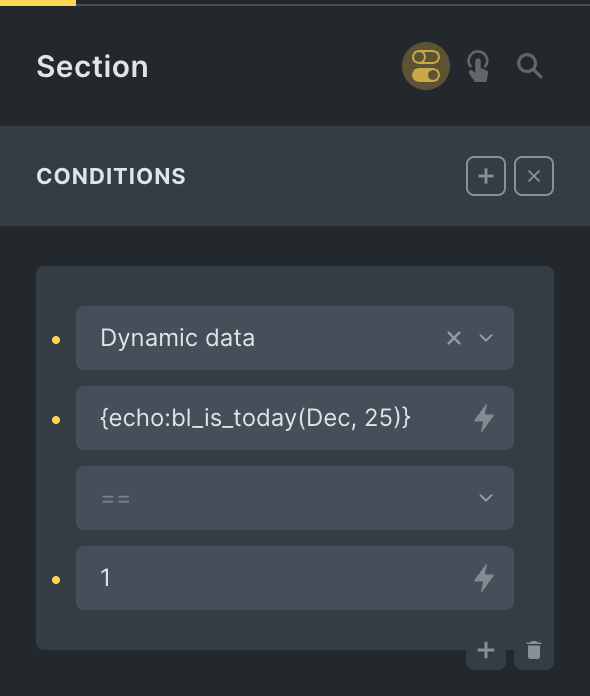
Pro Month and Day Condition in BricksThis Pro tutorial shows how we can define a custom function that takes in a month in the three-letter format (like Dec) and a day…Read more →Categories: Bricks, ProTags: Conditions, Dynamic Data
Is WooCommerce Cart Empty Condition in BricksUpdated on 5 Nov 2024 Looking to conditionally render an element depending on whether the user's cart is empty or not when using WooCommerce? Add…Read more →Categories: Bricks, Free, Plugins, WordPressTags: Conditions, WooCommerce
Pro Condition to Check if the Current Category Has At Least One ChildLooking to render an element in the category archive Bricks template only if the category of the current category archive page is a parent? This…Read more →Categories: Bricks, Pro, WordPressTags: Dynamic Data
Pro Conditional Rendering of ACF Repeater Rows Based on True / False Sub Field in BricksThis Pro tutorial provides the steps to modify a ACF Repeater query loop to only output the rows for which a True / False type…Read more →Categories: Bricks, Plugins, ProTags: ACF Repeater
Bricks Condition for WishList MemberHow to render a Bricks element only if the user has access to a specified WishList Member level.Read more →Categories: Bricks, Free, PluginsTags: Conditions
Pro How to Insert Element(s) Between Query Loop Posts in BricksUpdate on 16 Aug 2023: Follow this tutorial instead. This Pro tutorial shows how we can insert a Div (or any custom HTML) after nth…Read more →Categories: Bricks, ProTags: Conditions, Dynamic Data, Query Loop
Pro Check if the User Purchased Any of the Specified ProductsThis Pro tutorial provides the steps for setting up a dynamic data condition on any element in Bricks so it can be output only if…Read more →Categories: Bricks, Plugins, ProTags: Conditions, Dynamic Data, WooCommerce