3rd Jan '24
/
6 comments

Events grouped by Event Date custom field in Bricks

This Pro tutorial for Bricks users provides the steps to output posts of an event custom post type dynamically grouped by the value of their event_date, a date-type custom field (tested with ACF, should also work with other custom field plugins).

Sample data:

  • Event 1: 7 Jul 2020
  • Event 2: 30 Oct 2018
  • Event 3: 14 Dec 2021
  • Event 4: 1 Apr 2020
  • Event 5: 22 Jan 2030
  • Event 6 (no event date)

Output after implementing the tutorial:
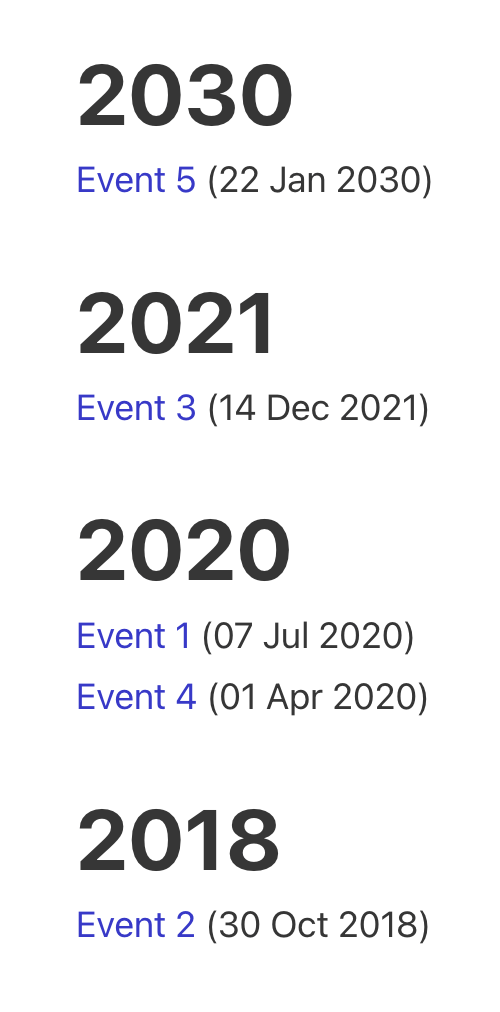
This is similar to the Events Grouped by Event Year tutorial, but unlike the earlier one, here we use Bricks elements for the year headings, post title links, etc.

This is a great example to study and understand how to build custom nested query loops in Bricks visually.

Here's the strategy:

  • Add a new "Event Years" query type.
  • Define a custom function in which we loop through the events whilst ensuring that only the events with non-empty event date are considered and in descending order of event date post meta. This function will be set to return an array of 2 items. The 1st one is an array of all unique years. The 2nd one is an array of years mapped to the corresponding post IDs.
  • In Bricks, create two query loops, one inside another.
  • Set the query type of the outer loop to the above function's 1st item, i.e., the array of unique years.
  • For the inner loop, enable PHP query editor and set its post__in parameter to the above custom function's 2nd item with its array key set to the year from the outer loop.

Step 1

Create event CPT and an associated event_date custom field.

There is no need to set the Return Format to Ymd.

Edit event posts and set dates for each.

We shall only fetch the events for which the event date is not empty.

Step 2

Add the following in child theme's functions.php or a code snippets plugin:

This is a BricksLabs Pro tutorial.

For full access login below or create your BricksLabs Pro account

Get access to all 633 Bricks code tutorials with BricksLabs Pro

Related Tutorials..

Pro
ACF Font Awesome Field in Bricks

ACF Font Awesome Field in Bricks

We walk through using the Advanced Custom Fields: Font Awesome Field plugin for showing Font Awesome icons.
Categories:
Tags:
Pro
Dynamic Posts Lightbox in Bricks using GLightbox

Dynamic Posts Lightbox in Bricks using GLightbox

Steps to set create a dynamic lightbox with content from the post inside of the query loop.
Categories:
Pro
Related Services grouped by Service Categories on Single Branch Posts in Bricks

Related Services grouped by Service Categories on Single Branch Posts in Bricks

How to query ACF relationship fields on single CPT templates.
Categories:
Pro
CPT Submenu Items in ACF Pro Options Admin Menu

CPT Submenu Items in ACF Pro Options Admin Menu

This Pro tutorial provides the steps to add links to admin pages under an Options page created with ACF Pro. All code mentioned in this…
Pro
Events Grouped by Event Year

Events Grouped by Event Year

In this Pro tutorial, we share the PHP code for outputting past events grouped by the event year in descending order of the event year.…
Categories:
Tags:
Pro
Posts Grouped by Month and Year in Bricks

Posts Grouped by Month and Year in Bricks

Nesting query loops with months & years in descending order, with the inner loop outputting the posts.
Categories:
Color Custom Field as Section Background Color on Category/Term Archives in Bricks

Color Custom Field as Section Background Color on Category/Term Archives in Bricks

How to use a color from a taxonomy term custom field for as the hero section background color on archive pages.
Categories:
Tags: