22nd Feb '26
/
0 comments

How to show data of a post whose ID is the value of a URL parameter in Bricks

In the Bricks Facebook group, a user asks:

Hey Everyone,
I am trying to create the following:
1- I have a Custom Post Type
2- I have a static page, and in the URL, I am displaying a URL parameter that contains the ID of the custom post type.
I want to display dynamic data (i.e. post title) on the static page, but based on the ID in the URL.
How can I achieve this result? I tried using the dynamic fields but not able to get the data based on the url parameter.

This tutorial shows how a single post (of any post type) can be output on a Page/template whose ID is taken from the URL parameter.

Consider this URL: https://example.com/sample-page/?page_id=24

We can set up a query loop on a Block element in Bricks, select the post type (post by default), set the number of posts to 1, enable no_found_rows, turn on PHP query and specify an array having the key of p and the value set to the value of the page_id URL parameter. This array will then be merged with the query loop’s array of arguments and any dynamic data like the post_title (in curly braces) inside the Block will show that specific post’s data.

Enable PHP query on the Block and paste:

replace post_id with the name of your URL parameter.

Add a Heading inside the Block and change its text to:

{post_title}

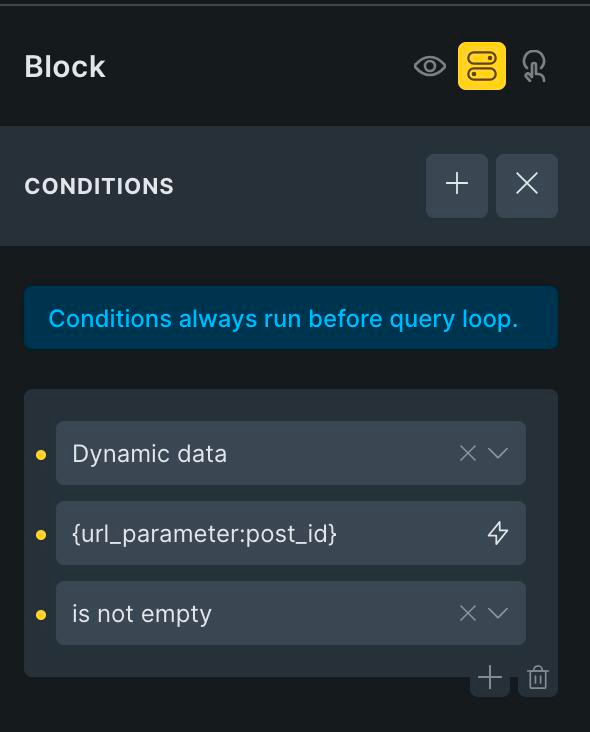
Additionally, you may want to add this dynamic data condition on the query loop-enabled Block to ensure that it gets output only if the URL parameter has a value.
Get access to all 630 Bricks code tutorials with BricksLabs Pro

Leave the first comment


Related Tutorials..

Pro
Posts from Random Categories in Bricks

Posts from Random Categories in Bricks

Updated on 31 Jul 2023 In BricksLabs Facebook group a user asked: How would you query 3 WordPress posts from 3 different categories with Brick…
Pro
Top-level Pages and Children Bricks Query Loop

Top-level Pages and Children Bricks Query Loop

This Pro tutorial for Bricks users can be considered Part 2 or a variation of the earlier Bricks Query Loop for Top-level Parent Pages with…
Categories:
Pro
Related Services grouped by Service Categories on Single Branch Posts in Bricks

Related Services grouped by Service Categories on Single Branch Posts in Bricks

How to query ACF relationship fields on single CPT templates.
Categories:
Pro
Masonry for Query Loop in Bricks

Masonry for Query Loop in Bricks

If you are looking to implement masonry with a 'view more' button i.e., click-type of infinite scroll follow this tutorial instead. Updated on 15 Mar…
Categories:
Pro
6 Random Posts from Tag A + 6 Random Posts from Tag B in a Single Bricks Query Loop

6 Random Posts from Tag A + 6 Random Posts from Tag B in a Single Bricks Query Loop

Displaying two set of random posts, inside one query loop.
Categories:
Displaying SureCart Featured Products & Products Collections with a Query Loop

Displaying SureCart Featured Products & Products Collections with a Query Loop

We walk through how to use a query loop to display SureCart products, featured products & collections.
Categories:
Pro
Adjacent Posts Bricks Query Loop

Adjacent Posts Bricks Query Loop

This Pro tutorial provides the steps to customize a posts query loop in Bricks to show previous and next posts on single post pages. The…
Categories: