16th Sep '25
/
9 comments

Staggered Entry Animations for Posts in Bricks Query Loops

This Pro tutorial provides the steps for animating the posts output by a Bricks query loop in a staggered animation.

We will cover 3 cases:

  1. once per page load
  2. once when scrolling from top to bottom as the posts come into view
  3. multiple times when scrolling from top to bottom or bottom to top as the posts come into view

CSS-only approach when the number of posts is known

If the number of posts is fixed/known, we can just use CSS. The downside is that the staggered animations run on page load and not when the posts come into view as they are scrolled to. If you prefer the fade in animations as the posts come into view, use the JavaScript approach detailed further down.

Set up your posts query loop.

If you want a head start, copy and paste the fully-built Section from here.

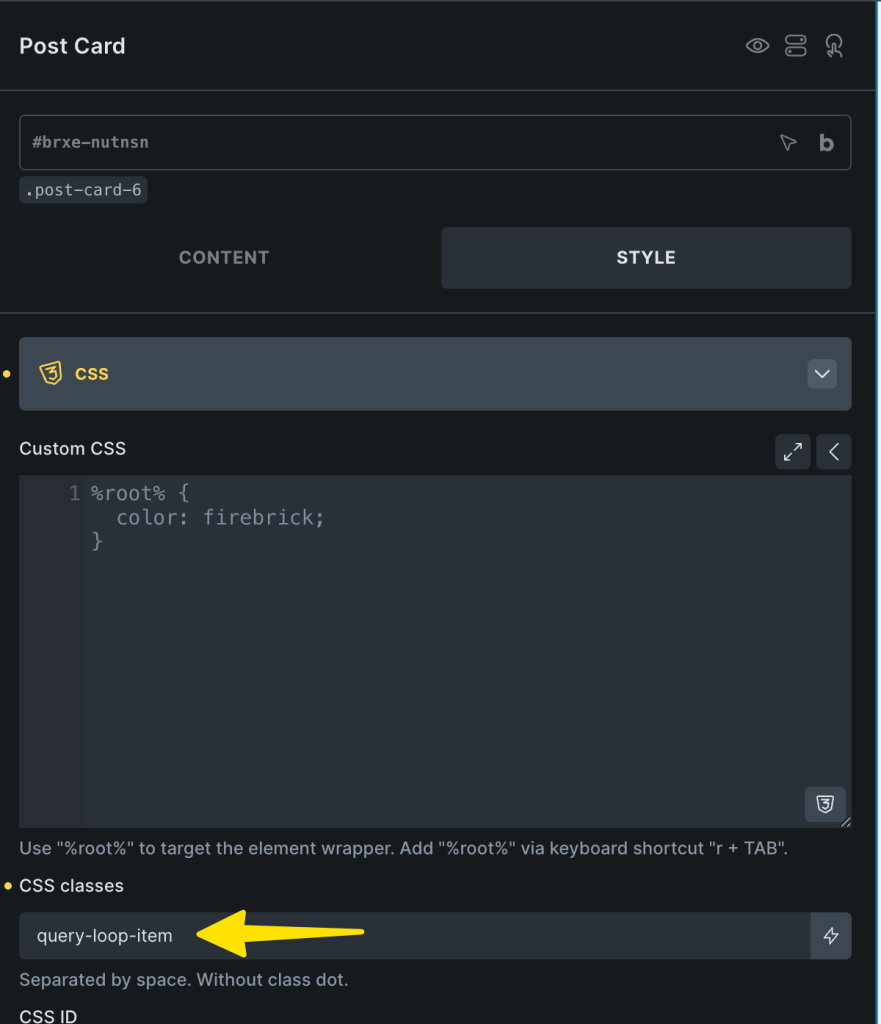
Select the query loop-enabled Block element, go to its CSS settings and add this class: query-loop-item
In the Page/Template PAGE SETTINGS, add this in Custom CSS:

This is a BricksLabs Pro tutorial.

For full access login below or create your BricksLabs Pro account

Get access to all 633 Bricks code tutorials with BricksLabs Pro

Related Tutorials..

Pro
Related Episodes Grouped by Episode Chapters on Single Podcasts in Bricks when using JetEngine

Related Episodes Grouped by Episode Chapters on Single Podcasts in Bricks when using JetEngine

A user asks: How to Display Related Episodes Grouped by Chapters on a Podcast Page in Bricks? Hi everyone, I have two post types created…
How to create filters with IsotopeJS in Bricks (Part 4): AJAX filter and infinite loops, Sorting, List view and Disable animations

How to create filters with IsotopeJS in Bricks (Part 4): AJAX filter and infinite loops, Sorting, List view and Disable animations

This tutorial will explain how to enable the AJAX filter with an infinite scroll query loop container, how to add a sorting function, how to…
Categories:
Pro
Displaying Gallery of SureCart Product Images with Bricks’ Query Loop

Displaying Gallery of SureCart Product Images with Bricks’ Query Loop

Custom query loop for looping through SureCart product images.
Categories:
Tags:
Pro
Conditionally Outputting Query Loop Item Based on Post Meta in Bricks

Conditionally Outputting Query Loop Item Based on Post Meta in Bricks

Rendering query-loop enabled posts depending on the value of each post's custom field value is tricky because by default, the custom field plugins' functions or…
Categories:
Pro
Upcoming Events with ACF Date Sub field Repeaters grouped by Month Years in Bricks

Upcoming Events with ACF Date Sub field Repeaters grouped by Month Years in Bricks

In the comments section of Upcoming Events Accordion in Bricks Grouped by 'Month Year' a member asked: CPT: eventACF Field: event_dates (Repeater) with event_date sub…
Categories:
How to create filters with IsotopeJS in Bricks (Part 3): apply multiple filters

How to create filters with IsotopeJS in Bricks (Part 3): apply multiple filters

This tutorial will review how to apply multiple filters to an isotope container using the IsotopeJS library‘s features in Bricks.
Pro
Stripe’s Animated Gradient in Bricks

Stripe’s Animated Gradient in Bricks

This Pro tutorial provides the steps to set up an animated gradient as a background of a section in Bricks using the code generated by…
Categories: