Brain has frozen – need some help please. [ query help… not grid display help ]
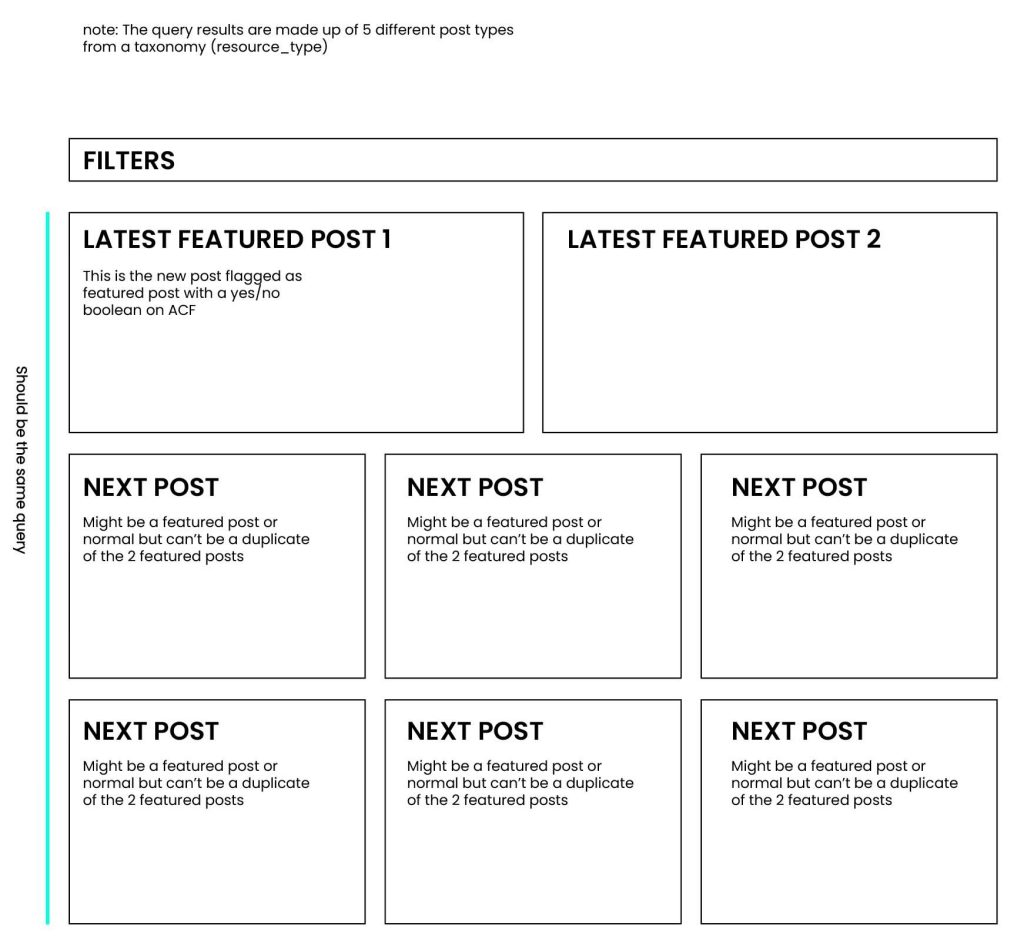
I would like to display Bricks builder query results from 5 CPTs (resources). I want the first 2 results of the query to be the newest 2 posts marked as ‘Featured’ (based on a yes/no ACF field) from the different CPTs.
I would like the rest of the results to continue in date order and not repeat the 2 featured posts.
There will always be at least 2 featured posts, but only the two latest should be featured first. The 3rd, 4th, 5th etc featured post should just appear in the normal query loop output.
And the results use a Bricks filter… so having 2 query loops is not an option.
We can use AI to help unfreeze our brains sometimes or at least have it write the code with us after giving directions on the logic 😅.
Here’s the PHP query for this:
// Define your post types - adjust these to match your actual CPT slugs
$post_types = ['resource']; // or ['type1', 'type2', 'type3', 'type4', 'type5']

// Step 1: Get the 2 latest featured posts
$featured_args = [
	'post_type' => $post_types,
	'posts_per_page' => 2,
	'orderby' => 'date',
	'order' => 'DESC',
	'meta_query' => [
		[
			'key' => 'featured', // Replace with your ACF field name
			'value' => '1',
			'compare' => '='
		]
	],
	'fields' => 'ids',
	'no_found_rows' => true,
];

$featured_post_ids = get_posts( $featured_args );

// Step 2: Get all other posts (excluding the 2 featured posts)
$other_args = [
	'post_type' => $post_types,
	'posts_per_page' => 100, // Adjust based on total posts expected
	'orderby' => 'date',
	'order' => 'DESC',
	'fields' => 'ids',
	'no_found_rows' => true,
];

// Exclude the 2 featured posts if found
if ( ! empty( $featured_post_ids ) ) {
	$other_args['post__not_in'] = $featured_post_ids;
}

$other_post_ids = get_posts( $other_args );

// Step 3: Merge arrays - featured posts first, then the rest
$final_post_ids = array_merge( $featured_post_ids, $other_post_ids );

// Return empty result if no posts found
if ( empty( $final_post_ids ) ) {
	return ['post__in' => [0]];
}

// Step 4: Return query args maintaining the order
return [
	'post_type' => $post_types,
	'posts_per_page' => -1, // Show all, or set a number for pagination
	'post__in' => $final_post_ids,
	'orderby' => 'post__in', // Maintains the order we set
	'no_found_rows' => true,
];
Thanks for sharing, but this doesn' t work for me. The featured posts are not the first, it just simply put everything in date order. I have almost the same task, with a slight difference. I need 4 featured post from the same acf post type, but with random order on the first 4, and in random order the rest afterwards and it needs to be filterable. I just tried this too, because it's almost the same, but I don't think it works as it should. The AI told me, if I use a meta query, I can't specify an order. I don't kno about that...
Thank you, but it is not working. I just wanted to let you know, that the featured posts are not the first ones in any of the these queries. I tried both the original code and the modified one. I even tried to fix it with AI, but it couldn't help. It seems that the "order by" only takes effect after the "array_merge" (i tried with array_unshift too) and the featured posts get mixed in with the rest.









5 comments
Rene
Thanks for sharing Sridhar.
Akos
Thanks for sharing, but this doesn' t work for me. The featured posts are not the first, it just simply put everything in date order. I have almost the same task, with a slight difference. I need 4 featured post from the same acf post type, but with random order on the first 4, and in random order the rest afterwards and it needs to be filterable. I just tried this too, because it's almost the same, but I don't think it works as it should. The AI told me, if I use a meta query, I can't specify an order. I don't kno about that...
Sridhar Katakam
https://pastebin.com/raw/G28egjS7
Akos
Thank you, but it is not working. I just wanted to let you know, that the featured posts are not the first ones in any of the these queries. I tried both the original code and the modified one. I even tried to fix it with AI, but it couldn't help. It seems that the "order by" only takes effect after the "array_merge" (i tried with array_unshift too) and the featured posts get mixed in with the rest.
Sridhar Katakam
I can take a look if I have WP admin access.
hello@brickslabs.com