22nd Feb '26
/
0 comments

How to show data of a post whose ID is the value of a URL parameter in Bricks

In the Bricks Facebook group, a user asks:

Hey Everyone,
I am trying to create the following:
1- I have a Custom Post Type
2- I have a static page, and in the URL, I am displaying a URL parameter that contains the ID of the custom post type.
I want to display dynamic data (i.e. post title) on the static page, but based on the ID in the URL.
How can I achieve this result? I tried using the dynamic fields but not able to get the data based on the url parameter.

This tutorial shows how a single post (of any post type) can be output on a Page/template whose ID is taken from the URL parameter.

Consider this URL: https://example.com/sample-page/?page_id=24

We can set up a query loop on a Block element in Bricks, select the post type (post by default), set the number of posts to 1, enable no_found_rows, turn on PHP query and specify an array having the key of p and the value set to the value of the page_id URL parameter. This array will then be merged with the query loop’s array of arguments and any dynamic data like the post_title (in curly braces) inside the Block will show that specific post’s data.

Enable PHP query on the Block and paste:

replace post_id with the name of your URL parameter.

Add a Heading inside the Block and change its text to:

{post_title}

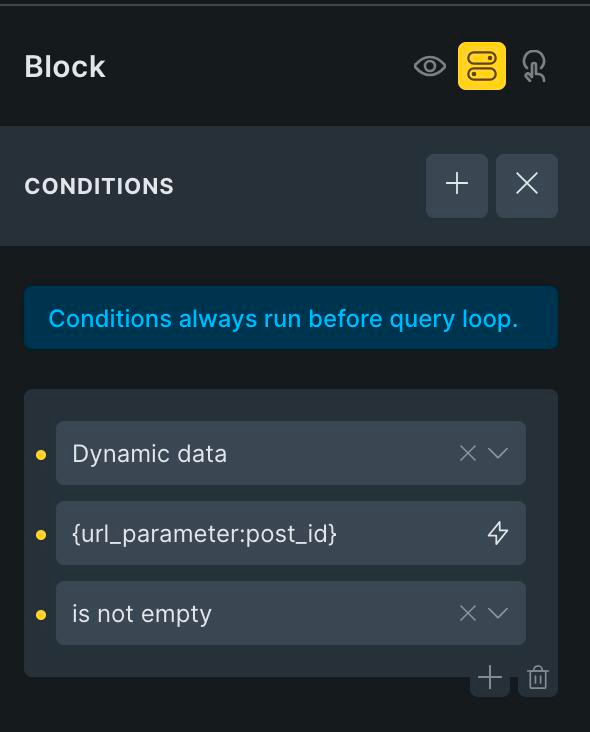
Additionally, you may want to add this dynamic data condition on the query loop-enabled Block to ensure that it gets output only if the URL parameter has a value.
Get access to all 633 Bricks code tutorials with BricksLabs Pro

Leave the first comment


Related Tutorials..

Pro
Adjacent Posts Bricks Query Loop

Adjacent Posts Bricks Query Loop

This Pro tutorial provides the steps to customize a posts query loop in Bricks to show previous and next posts on single post pages. The…
Categories:
Latest Featured Posts First in Bricks Query Loop (No Duplicates)

Latest Featured Posts First in Bricks Query Loop (No Duplicates)

In the Bricks Facebook group a user asks: We can use AI to help unfreeze our brains sometimes or at least have it write the…
Categories:
How to Show Future Events in Bricks

How to Show Future Events in Bricks

One of the common requirements in WordPress is being able to filter the events (or could be posts of any post type) to only those…
Categories:
Related Posts by Author in Bricks

Related Posts by Author in Bricks

Querying posts on single posts by the author of the current post.
Categories:
Pro
Upcoming Events Grouped by ‘Month Year’ in Bricks

Upcoming Events Grouped by ‘Month Year’ in Bricks

A custom query loop type for showing future events based on a date custom field using three nested query loops.
Pro
Related Posts by Taxonomy in Bricks

Related Posts by Taxonomy in Bricks

In the previous Posts Related by Current Post's Terms in Bricks tutorial, we showed how posts related to the current single post that have the…
Categories:
Pro
Displaying Gallery of SureCart Product Images with Bricks’ Query Loop

Displaying Gallery of SureCart Product Images with Bricks’ Query Loop

Custom query loop for looping through SureCart product images.
Categories:
Tags: