18th Mar '23
/
3 comments

ACF Repeater Sub Field Values as Tabs in Bricks

Bricks’ query loop supports ACF Repeaters and Meta Box Groups out of the box besides posts, users and terms.

This tutorial shows how we can output the values of sub fields of a ACF Repeater as tab titles and content in Bricks without writing a single line of code, thanks to its nestable Tabs element.

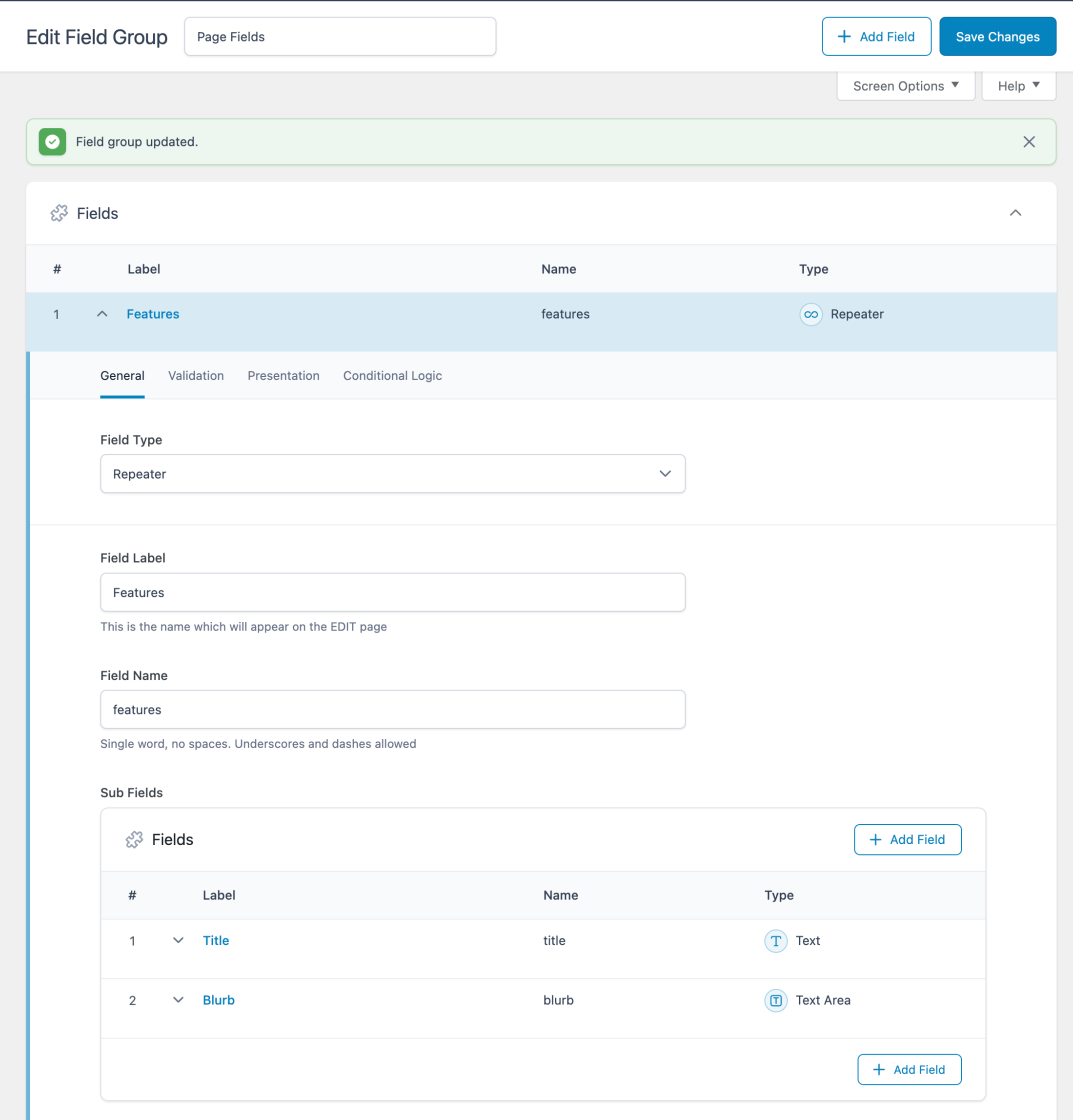
ACF Field Group:
Repeater being populated for a specific Page:

Tabs on the front end:

Create a Tabs (Nestable) element inside a Section’s Container.

Delete the second Div under the “Tab menu” element.

Delete the second Pane under the “Content” element.

Select the Div under the Tab menu and enable query loop.

Click the query icon and set the query type to your ACF Repeater.

Change the text of the Basic Text element inside to your Title sub field using the dynamic data (bolt) button.

It should look like this:

{acf_features_title}

Select the Pane under the Content and enable query loop.

Click the query icon and set the query type to your ACF Repeater.

Change the text of the Rich Text element inside to your Title sub field.

It should look like this:

{acf_features_blurb}

JSON export of the Section.

Get access to all 625 Bricks code tutorials with BricksLabs Pro

3 comments

  • Rhett Butler

    Looking through this article and similar ones for nested subfields and terms contained inside of a Repeater or Flexible Layout field, how would you pull individual Term IDs from a nested ACF taxonomy field?

    Example: •ACF Flexible field “flexible_layouts” ••ACF Layout “dynamic_section” •••ACF Taxonomy field “terms”

    Layout need: Use flexible layout with term cards contained inside based on the selected terms for that layout section.

    Bricks default behavior is to output a taxonomy field as the term name, or the term url vs. the ACF flexible taxonomy field being stored as an array of IDs.

  • Nicolas Heinen

    I've been able to do it with Bricks Condition: https://nickarce.com/products/bricks-condition-check-repeater/

  • Nicolas Heinen

    Would it be easily possible to only display the one tab where by exemple the {acf_features_title} equal to the_post_title() of the page ?

    So if the Title of my page is "Feature 1", it would only display the second tab.

    Thanks,

    Nicolas.

Leave your comment


Related Tutorials..

Auto-switching Bricks Tabs

Auto-switching Bricks Tabs

How to switch tabs every x seconds when the tabs element is scrolled into view.
Categories:
Pro
How to Link to a Specific Tab in Bricks

How to Link to a Specific Tab in Bricks

This Pro tutorial provides the JavaScript code that will automatically switch to the tab when using Nestable Tabs elements based on the "tab" URL parameter…
Categories:
Pro
Conditional Rendering of ACF Repeater Rows Based on True / False Sub Field in Bricks

Conditional Rendering of ACF Repeater Rows Based on True / False Sub Field in Bricks

This Pro tutorial provides the steps to modify a ACF Repeater query loop to only output the rows for which a True / False type…
Categories:
Pro
Related Services grouped by Service Categories on Single Branch Posts in Bricks

Related Services grouped by Service Categories on Single Branch Posts in Bricks

How to query ACF relationship fields on single CPT templates.
Categories:
Pro
Programmatically populating ACF field values in WordPress

Programmatically populating ACF field values in WordPress

An example of how to set the values of a Select-type field with the names and labels of all public post types.
Categories:
Pro
How to Add a Live Search to Filter Posts Grouped by Categories in Tabs

How to Add a Live Search to Filter Posts Grouped by Categories in Tabs

This Pro tutorial builds on top of the earlier Dynamic Tabs in Bricks tutorial and provides steps to add a live search input for filtering…
Categories:
Tags:
How to populate a map with dynamic markers from a CPT using ACF in Bricks (PART 2)

How to populate a map with dynamic markers from a CPT using ACF in Bricks (PART 2)

This tutorial provides the PHP & JS codes that can be pasted in order to create a flying effect on map markers each time your…
Pro
Category Grid with ACF Images in Bricks

Category Grid with ACF Images in Bricks

Creating a grid of post categories, each category card showing an image from an ACF field, category name & description.
Categories:
Pro
Bricks Slider Images From ACF Flexible Content Sub Field

Bricks Slider Images From ACF Flexible Content Sub Field

Consider the following field group associated with Pages when using ACF Pro: "Page Fields" field group|_"Page Content" Flexible Content field|__"Layout 1" layout|___"Title" Text field|___"Layout 1…