
Bricks’ query loop supports ACF Repeaters and Meta Box Groups out of the box besides posts, users and terms.
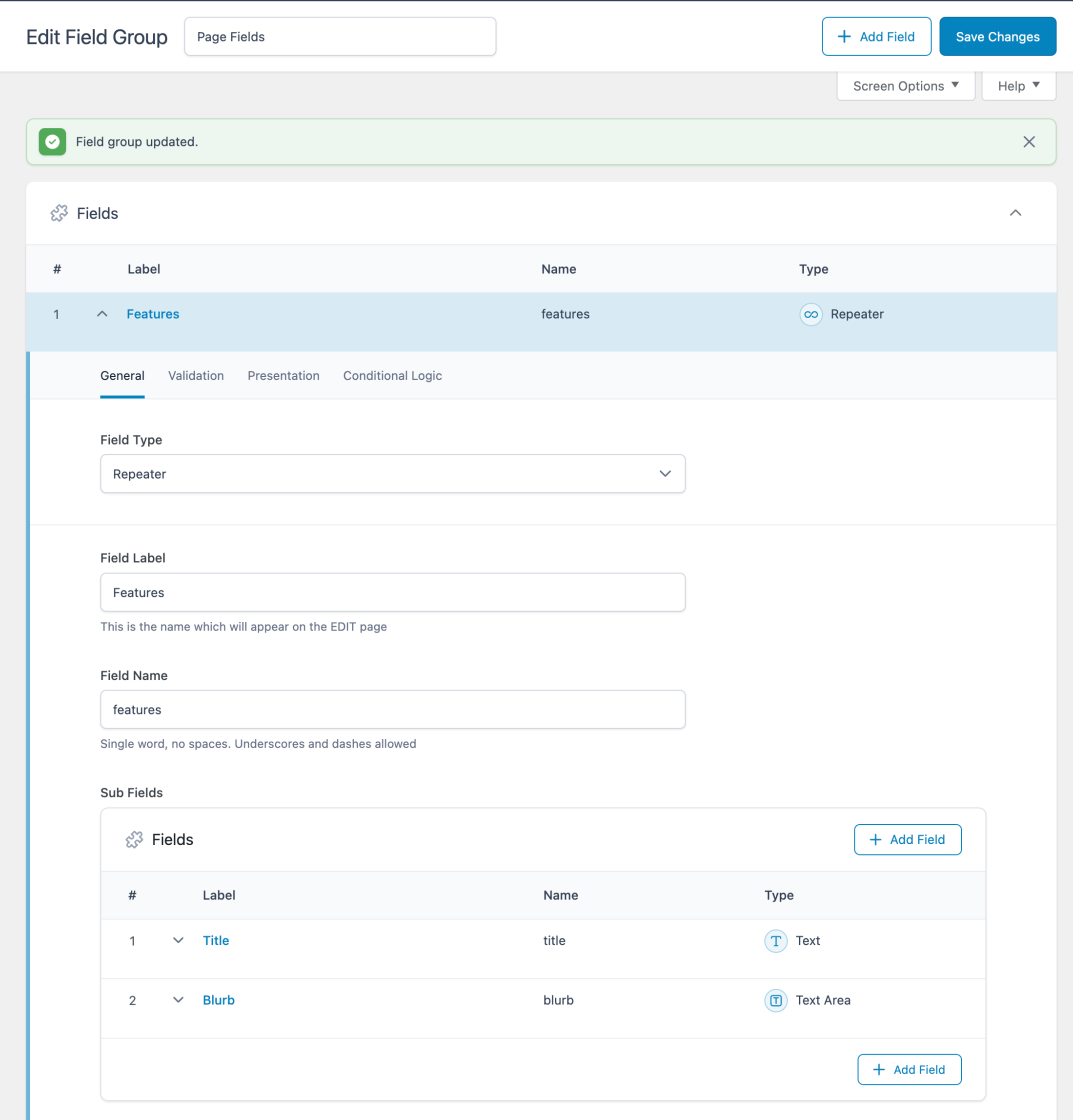
This tutorial shows how we can output the values of sub fields of a ACF Repeater as tab titles and content in Bricks without writing a single line of code, thanks to its nestable Tabs element.
ACF Field Group:
Repeater being populated for a specific Page:

Tabs on the front end:

Create a Tabs (Nestable) element inside a Section’s Container.
Delete the second Div under the “Tab menu” element.
Delete the second Pane under the “Content” element.
Select the Div under the Tab menu and enable query loop.
Click the query icon and set the query type to your ACF Repeater.
Change the text of the Basic Text element inside to your Title sub field using the dynamic data (bolt) button.
It should look like this:
{acf_features_title}
Select the Pane under the Content and enable query loop.
Click the query icon and set the query type to your ACF Repeater.
Change the text of the Rich Text element inside to your Title sub field.
It should look like this:
{acf_features_blurb}




3 comments
Rhett Butler
Looking through this article and similar ones for nested subfields and terms contained inside of a Repeater or Flexible Layout field, how would you pull individual Term IDs from a nested ACF taxonomy field?
Example: •ACF Flexible field “flexible_layouts” ••ACF Layout “dynamic_section” •••ACF Taxonomy field “terms”
Layout need: Use flexible layout with term cards contained inside based on the selected terms for that layout section.
Bricks default behavior is to output a taxonomy field as the term name, or the term url vs. the ACF flexible taxonomy field being stored as an array of IDs.
Nicolas Heinen
I've been able to do it with Bricks Condition: https://nickarce.com/products/bricks-condition-check-repeater/
Nicolas Heinen
Would it be easily possible to only display the one tab where by exemple the {acf_features_title} equal to the_post_title() of the page ?
So if the Title of my page is "Feature 1", it would only display the second tab.
Thanks,
Nicolas.