28th Feb '25
/
9 comments

Filtering Bricks Query Loop By Meta Box Relationship

In the Bricks Facebook group a user asks:

Display based on relationship

I'm trying to run a query loop that only outputs posts that have a value in their relationship. So there are Services Areas and City Pages. Some of the Service Areas do not yet have City Pages written for them, but will be adding over the next few months.

I want my query loop to only output Service Areas that have a related City Page. I can't seem to make it work.

Consider this setup:

CPTs: Service Areas and City Pages

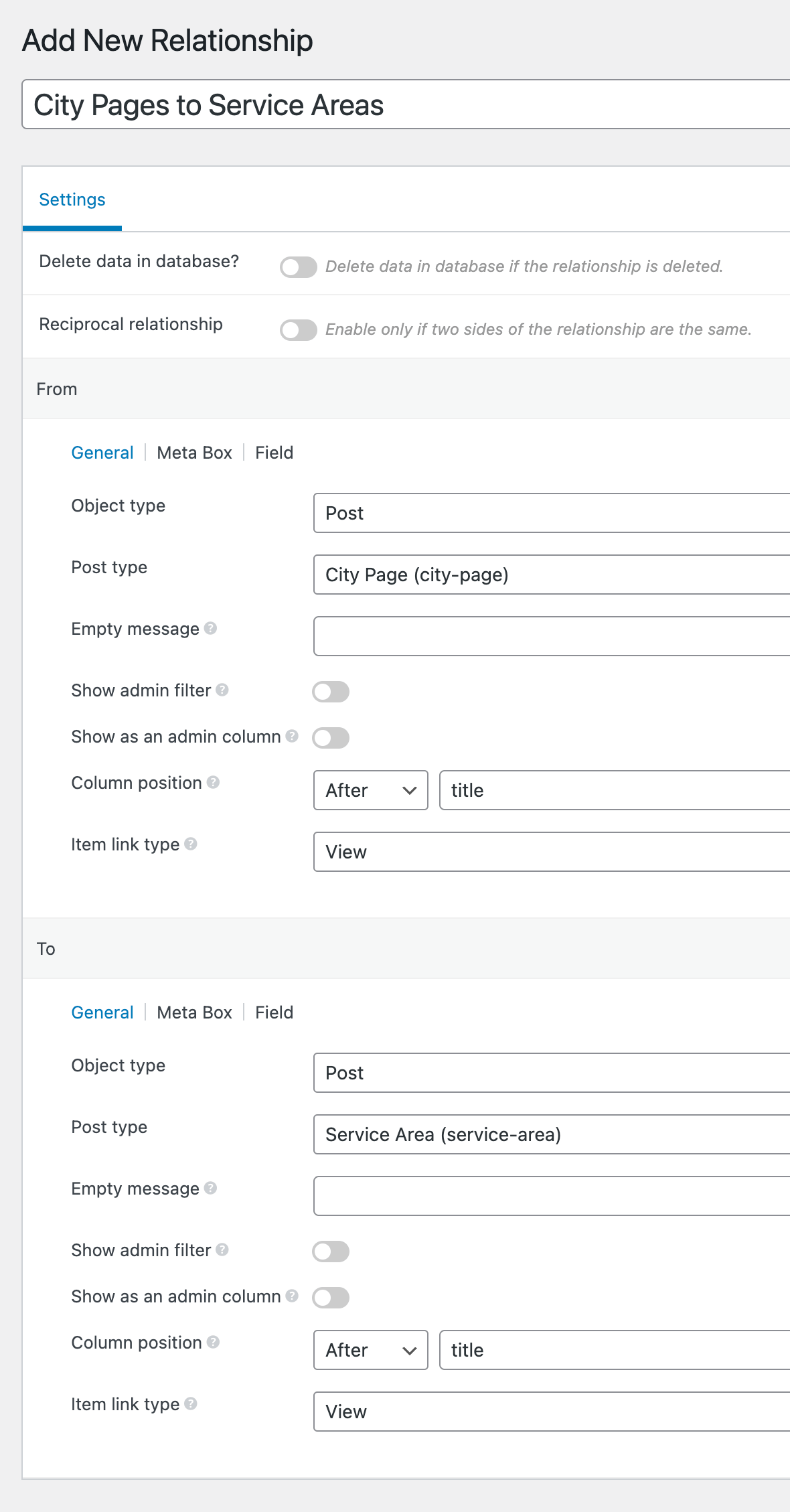
Meta Box Relationship: City Pages to Service Areas

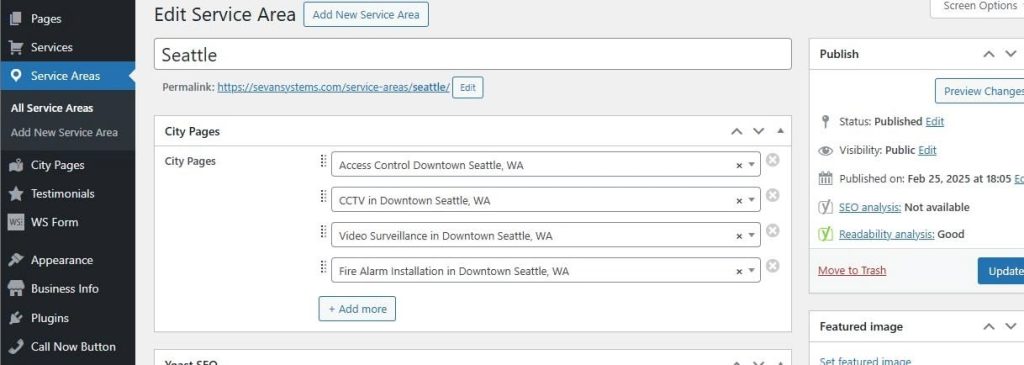
A Service Area post can have 0 or 1 or more City Page(s).

Sample Service Area with some City Pages:

Sample Service Area with no City Pages:

The objective is to only output the Service Area posts that have at least 1 connected/related City Page.

Service Areas query loop by default:

Service Areas query loop after implementing this Pro tutorial:

Steps in brief:

In the Bricks Query Loop PHP editor

  1. Get all service area IDs.
  2. Loop through each service area and for each, check if there is at least 1 connected city using MB's Relationship API. If so, store the service area ID in an array.
  3. Set post__in to the above array.

Step 1

Install and activate Meta Box and its AIO extension.

Create both the CPTs and a relationship.

Step 2

Create a few Service Area posts whilst selecting the related City Pages as applicable.

Step 3

Edit a Page or a Template and set up a query loop on a Block.

Select Service Areas as the Post type.

Enable PHP query editor and paste:

This is a BricksLabs Pro tutorial.

For full access login below or create your BricksLabs Pro account

Get access to all 630 Bricks code tutorials with BricksLabs Pro

Related Tutorials..

Meta Box Category Colors in Single Posts

Meta Box Category Colors in Single Posts

Looking to use Meta Box Color Picker fields' values in a single post Bricks template based on the post category? This tutorial shows how. Note:…
Categories:
Tags:
Pro
Meta Box Relationship Posts Filtered by a Taxonomy Term in Bricks

Meta Box Relationship Posts Filtered by a Taxonomy Term in Bricks

Updated on 17 Feb 2025 In the Inner Circle a user asks: Hello, I have a relationship made in metabox between two Post Types “Travel”…
Categories:
Filtering Bricks Posts Query Loop by Meta Box Group’s Radio Subfield Value

Filtering Bricks Posts Query Loop by Meta Box Group’s Radio Subfield Value

In the past we showed how a Bricks posts query loop can be filtered by Meta Box group's subfield of types text/number and Datepicker here.…
Categories:
Pro
Dynamic Post-specific Templates in Bricks using Meta Box/ACF Select Field

Dynamic Post-specific Templates in Bricks using Meta Box/ACF Select Field

Update on 23 Aug 2023: Added steps for ACF. Bricks builder v1.8.4 introduced an pretty useful filter called bricks/active_templates that flew under the radar. This…
Output HappyFiles Folders in Metabox Select-Field

Output HappyFiles Folders in Metabox Select-Field

This tutorial is part of a series where I'm gonna show you how to output custom HappyFiles Galleries and Sliders. Part one will cover a…
Categories:
Pro
Filtering Query Loop Posts by a Non-empty Custom Field in Bricks

Filtering Query Loop Posts by a Non-empty Custom Field in Bricks

This Pro tutorial shows how we can prefilter the results of a query output by a Bricks query loop to only those for which the…
Categories:
Tags:
Pro
Meta Box Taxonomy Field’s Image Value in Posts

Meta Box Taxonomy Field’s Image Value in Posts

In a project I am currently working on, the requirement is to show the image of an "Image Advanced" type attached to a taxonomy in…
Categories:
Tags: