5th Feb '24
/
10 comments

Nav Menus Custom Query Types in Bricks

Updated on 21 Aug 2024

This Pro tutorial shows how custom query types for each navigation menu can be generated in Bricks.

This enables us to loop through the menu items of any nav menu and visually build menu items' titles/text linked to their URLs with optional descriptions.

Use case: When a footer from a design set like Frames is imported, delete all but the first list item, enable query loop on it, and select the nav menu from the query type dropdown to make the static items dynamic.
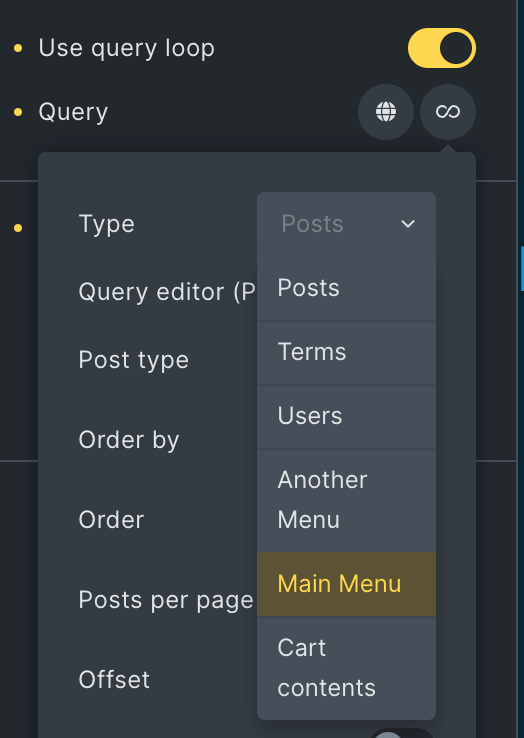
Note: All items of the selected menu will appear at the same level regardless of their hierarchy/depth in the menu. If hierarchy is to be maintained with indentation, you may want to use a Nav Menu element instead of this approach.

Step 1

Add the following in child theme's functions.php (w/o the opening PHP tag) or a code snippets plugin:

This is a BricksLabs Pro tutorial.

For full access login below or create your BricksLabs Pro account

Get access to all 610 Bricks code tutorials with BricksLabs Pro

Related Tutorials..

Pro
Custom Nested Queries in Bricks

Custom Nested Queries in Bricks

In most of the previous tutorials covering nested query loops in Bricks on this site, we accessed the parent query's looping object in the inner…
Categories:
Pro
Custom SQL Ordering for Sorting Events in Bricks

Custom SQL Ordering for Sorting Events in Bricks

Showing events ordered by the event date with upcoming events in ascending order and past events in descending order.
Categories:
Pro
Posts Grouped by Taxonomy Terms in Bricks using BricksExtras’ Dynamic Table and Pro Tabs

Posts Grouped by Taxonomy Terms in Bricks using BricksExtras’ Dynamic Table and Pro Tabs

How to output any post type, with the taxonomy terms as Tab titles and posts inside tables with sortable columns.
Pro
Ordering Posts by Terms in Bricks

Ordering Posts by Terms in Bricks

How to output upcoming events at the top and past events below in a single query loop in Bricks.
Categories: