20th Nov '25
/
0 comments

Upcoming Events in Bricks Grouped by ‘Month Year’ with Frontend Filtering by Event Type

This is a newer version of the earlier Upcoming Events Grouped by 'Month Year' in Bricks tutorial with these improvements:

  • two nested queries instead of three for the events grouped by month years
  • frontend filtering by event type (a custom taxonomy) using custom JavaScript

Step 1

Create event CPT and corresponding event-type taxonomy with a plugin like ACF.

Create a field group for your CPT having an event-date custom field of Date Picker (or Date and Time Picker).

For Date Picker type field, set return format to Y-m-dFor Date Time Picker type field, set return format to Y-m-d H:i:s

Publish some event posts having event type and event date for each.

Step 2

Let's

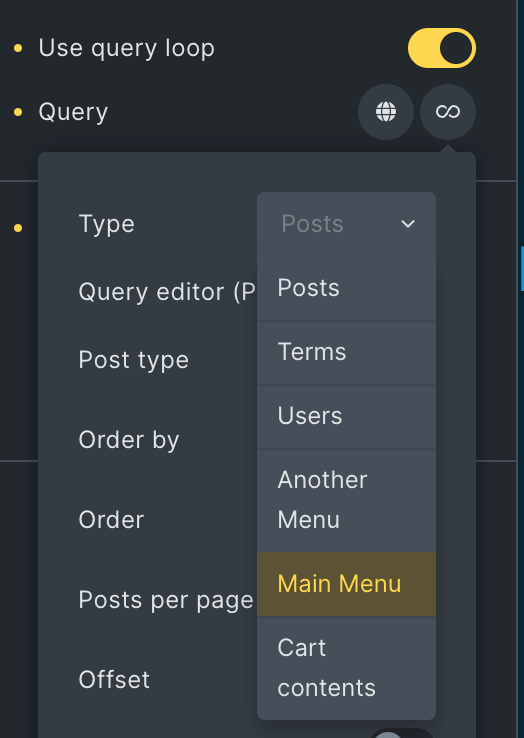
  • add a new "Event Month-Year" query loop type
  • create the callback function for the above query loop type
    • get all future events
    • loop through these events and organizes them into groups based on their month and year (e.g., "January 2025", "February 2025")
    • sort chronologically: ensure the months appear in the correct order (oldest month → newest month)
    • return an array having display (human-readable month-year label like January 2025) and posts (array of post IDs belonging to that month) keys
  • add a Bricks helper function to navigate nested query loops
  • create a helper function to get post IDs for the inner loop
    • bl_get_month_year_post_ids(): retrieves the post IDs from the parent month-year group
    • used in the inner post loop to only show events from the current month being looped
  • create a display helper function
    • bl_get_month_year_display(): return the formatted month-year string like "January 2025"
    • used in the Heading element to display the month-year title
  • create a taxonomy helper function
    • bl_get_event_types(): return space-separated taxonomy term slugs for an event
    • used as the value for data-event-type attribute on each event item

Add the following in child theme's functions.php (w/o the opening PHP tag) or a code snippets plugin:

This is a BricksLabs Pro tutorial.

For full access login below or create your BricksLabs Pro account

Get access to all 610 Bricks code tutorials with BricksLabs Pro

Related Tutorials..

Pro
Parent Query Loop Object – Traversing Nested Query Loops Up in Bricks

Parent Query Loop Object – Traversing Nested Query Loops Up in Bricks

Bricks enables us to build nested query levels of unlimited levels. Here are a couple of examples: Sometimes, you might want to obtain the parent…
Categories:
Pro
Posts from Random Categories in Bricks

Posts from Random Categories in Bricks

Updated on 31 Jul 2023 In BricksLabs Facebook group a user asked: How would you query 3 WordPress posts from 3 different categories with Brick…
Pro
Adding active class to the current term/post in a Bricks query loop on Term archives/single posts

Adding active class to the current term/post in a Bricks query loop on Term archives/single posts

Updated on 29 Feb 2024 In the Sibling Terms Bricks Query Loop tutorial, a member asked: How can I set the class "active" to the…
Categories:
Load more for Query loops in Bricks

Load more for Query loops in Bricks

Did you know that Bricks has AJAX loading for query loop posts on-click out of the box?
Categories:
Pro
Upcoming Events with ACF Date Sub field Repeaters grouped by Month Years in Bricks

Upcoming Events with ACF Date Sub field Repeaters grouped by Month Years in Bricks

In the comments section of Upcoming Events Accordion in Bricks Grouped by 'Month Year' a member asked: CPT: eventACF Field: event_dates (Repeater) with event_date sub…
Categories:
Pro
Parent post Bricks query loop

Parent post Bricks query loop

Updated on 5 Feb 2024 In the BricksLabs Facebook group a user asks: Is there a way to output the data of a parent post…
Categories:
Pro
Filtering posts by a group field’s subfield value with Meta Box when using a custom table in Bricks

Filtering posts by a group field’s subfield value with Meta Box when using a custom table in Bricks

Filtering a query loop to output only those posts with the value of a Select subfield of a Group field set to Yes when using…
Categories:
Tags:
Pro
CMB2 Repeatable Group Bricks Query Loop

CMB2 Repeatable Group Bricks Query Loop

This Pro tutorial provides the steps to create a custom query loop type for outputting the subfield values of a Group field (repeatable) when using…