4th Feb '25
/
2 comments

Meta Box Relationship Posts Filtered by a Taxonomy Term in Bricks

Updated on 17 Feb 2025

In the Inner Circle a user asks:

Hello,

I have a relationship made in metabox between two Post Types “Travel” AND “Programs”

When I am in post Type “Travel”, I want to query the relationship, so I only see the “Program” posts, filtered by a term=”long-travel” of a taxonomy “travel-types”

I think ACF has something to do this, but in Meta Box i dont know. May be I have to design a personlized query in bricks.?

Thank you

This Pro tutorial for Bricks users provides the steps to output posts (of Program CPT) related to the current single post (of Travel CPT) filtered to only those that have a specific taxomomy (program-type) term (long-travel) where the relationship is set up via Meta Box.

In other words, show only long travel programs related to the current travel entry.

Step 1

Install and active Meta Box and Meta Box AIO.

Create travel and program CPTs.

Add program-type taxonomy for the program CPT.

Populate the taxonomy with terms like 'Short Trip', 'Long Travel' as needed.

Populate the CPTs with some sample posts.

Step 2

Add a new Relationship.

Note the auto-generated ID of the relationship. In this case, it'd be travel-program.

Step 3

Edit all the posts of any of the two post types and set up the connected/related posts of the other post type.

Sample travel post:

In the above example, 'ArtVo Tour' program's program type is set to 'Short Trips'.

'Great Ocean Road Drive' program's program type is set to 'Long Travel'.

After implementing the tutorial, only 'Great Ocean Road Drive' will appear as the related program for Melbourne travel post since we are going to limit the related programs to only those that are termed 'Long Travel'.

Step 4

Create a template titled say 'Travel' of type 'Single'.

Edit it with Bricks.

Add a condition to apply the template to all single posts of Travel CPT.
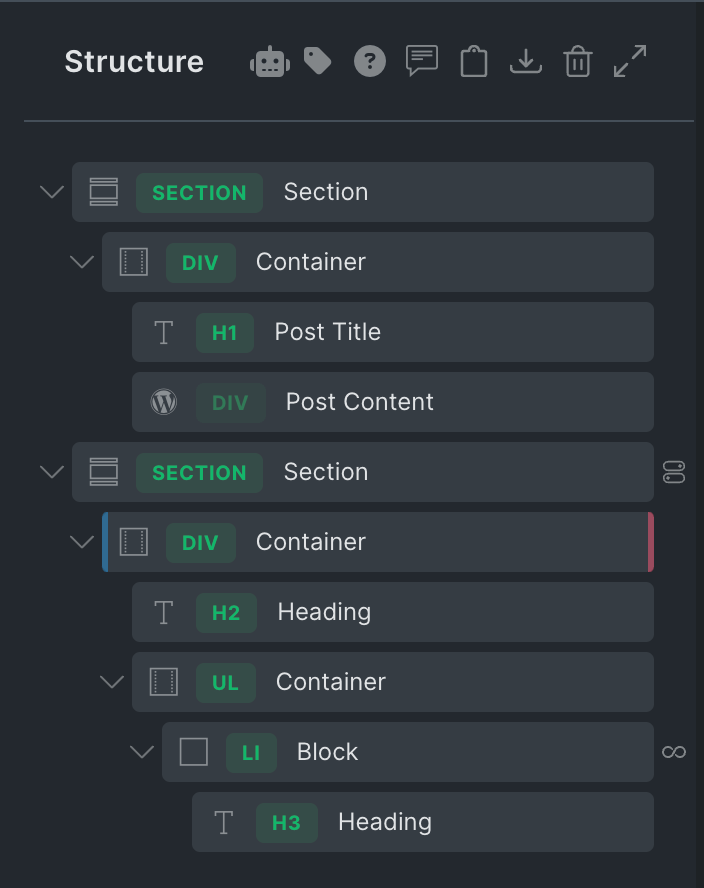
Add a Section showing the post title and content.

Add another Section and inside its Container, a Block.

Enable query loop on the Block and paste:

This is a BricksLabs Pro tutorial.

For full access login below or create your BricksLabs Pro account

Get access to all 633 Bricks code tutorials with BricksLabs Pro

Related Tutorials..

Pro
Dynamically Displaying Connected Content Offer Images in Bricks using Meta Box Relationship

Dynamically Displaying Connected Content Offer Images in Bricks using Meta Box Relationship

Consider the following scenario from a recent project I worked on. CPT 1: project CPT 2: content-offer Taxonomy for Projects: remodel-typeSample term names: Backyard Cottages…
Pro
Filtering Cloneable Meta Box Group by Sub Field Value in Bricks

Filtering Cloneable Meta Box Group by Sub Field Value in Bricks

This Pro tutorial provides the steps to filter the rows of a Meta Box cloneable group to only those that have a date custom field…
Pro
HappyFiles Folder Images via Meta Box Taxonomy Field in Bricks Image Gallery

HappyFiles Folder Images via Meta Box Taxonomy Field in Bricks Image Gallery

How to set the source of Bricks’ Image Gallery element on a post to images in the selected HappyFiles Folder(s) via a Meta Box Taxonomy…
Pro
Conditionally outputting an element in a Query Loop based on date-type custom field

Conditionally outputting an element in a Query Loop based on date-type custom field

This Pro tutorial shows how to output an element in a Bricks' query loop only if the value of a date-type of custom field for…
Categories:
Random Meta Box Image

Random Meta Box Image

Displaying a random image from a set of images from a Meta Box Images Advanced-type field.
Categories:
Tags:
Pro
Related Episodes Grouped by Episode Chapters on Single Podcasts in Bricks when using JetEngine

Related Episodes Grouped by Episode Chapters on Single Podcasts in Bricks when using JetEngine

A user asks: How to Display Related Episodes Grouped by Chapters on a Podcast Page in Bricks? Hi everyone, I have two post types created…
Pro
Meta Box Related Project’s Featured Image URL on Single Reviews

Meta Box Related Project’s Featured Image URL on Single Reviews

Updated on 26 Jun 2025 In a recent website I worked on, a requirement was to get the URL of the featured image of a…