8th Oct '25
/
0 comments

Filtering ACF Repeater Bricks Query Loop by Sub Field Value

In the BricksLabs Facebook group a user asked:

I'm displaying an ACF repeater on a page using Bricks query loop. I want to filter the rows based on a radio or select field. Is this possible, or should I use CPT in the query loop instead?

The ACF repeater is for a team members section. Each member has a role. My plan is to create 3 separate loops for each role and display the members in each role separately.

I know this is possible with a CPT but it's a requested modification to an already existing setup. Is it still doable with just querying the ACF repeater or should I just create a CPT and migrate the team members data there?

This Pro tutorial shows how ACF Repeater rows output by a Bricks query loop can be filtered using the bricks/query/run PHP filter.

Consider this field group attached to a Page:

and a sample Page with the Repeater field populated like this:
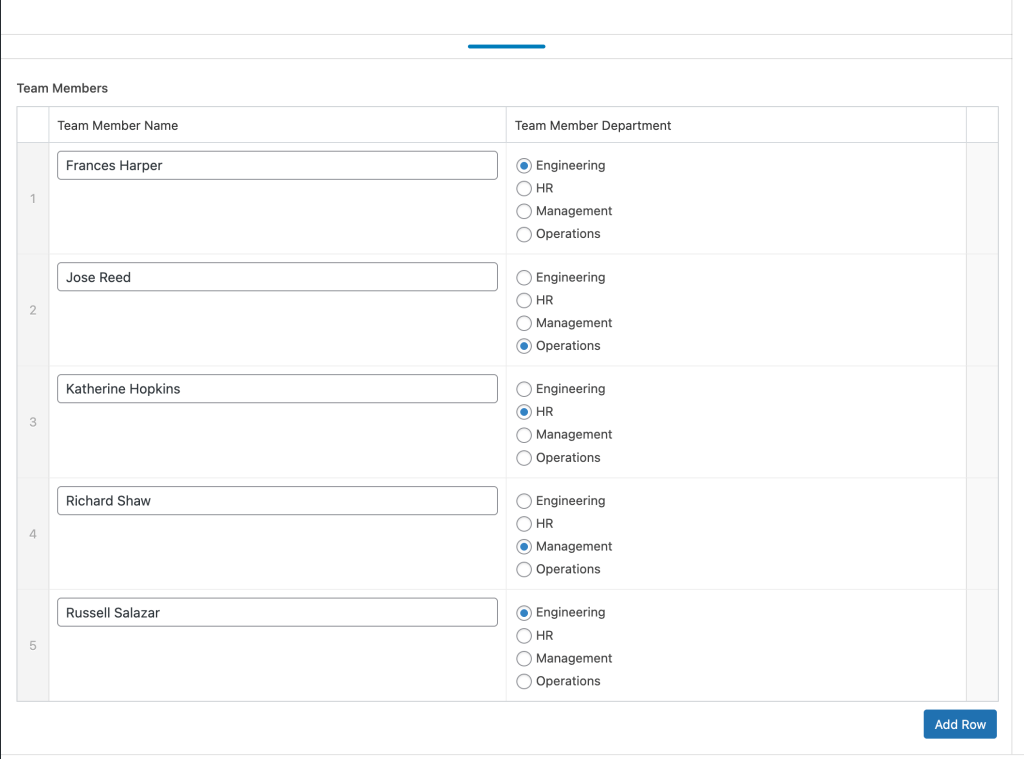
When this Page or a template that applies to this Page is edited with Bricks, a query loop can be enabled on a Block like this:
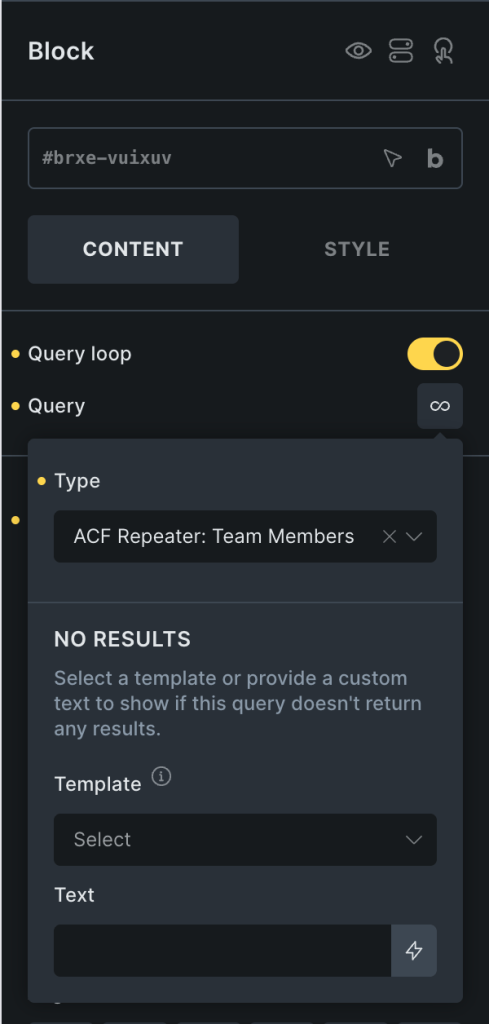
to show all the team members on the front end:

Now the objective is to say, show only the team members that are in the Engineering department or only in HR.

After implementing the tutorial - output of two different query loops, each filtered to show only the rows from matching department sub field name:

This works with any ACF field type that contains a string value.

Add the following in child theme's functions.php (w/o the opening PHP tag) or a code snippets plugin:

This is a BricksLabs Pro tutorial.

For full access login below or create your BricksLabs Pro account

Get access to all 610 Bricks code tutorials with BricksLabs Pro

Related Tutorials..

Pro
Filtering Cloneable Meta Box Group by Sub Field Value in Bricks

Filtering Cloneable Meta Box Group by Sub Field Value in Bricks

This Pro tutorial provides the steps to filter the rows of a Meta Box cloneable group to only those that have a date custom field…
Pro
ACF Font Awesome Field in Bricks

ACF Font Awesome Field in Bricks

We walk through using the Advanced Custom Fields: Font Awesome Field plugin for showing Font Awesome icons.
Categories:
Tags:
How to populate a map with dynamic markers from a CPT using ACF in Bricks (PART 1)

How to populate a map with dynamic markers from a CPT using ACF in Bricks (PART 1)

This tutorial provides the PHP & JS codes that can be pasted in order to create a dynamic map with markers populated from a custom…
Categories:
Pro
ACF Date Field Value Custom Format in Bricks

ACF Date Field Value Custom Format in Bricks

In the Bricks forum, a user asks: Hi there, I am setting up an events calendar using bricks. In some circumstances I would like to…
Categories:
Tags:
Pro
Bricks Dynamic Data Tag for Text-type Custom Field Value with Word Limit

Bricks Dynamic Data Tag for Text-type Custom Field Value with Word Limit

How to register a new dynamic tag for setting excerpt word limits and outputting an ellipsis (...) at the end.
Categories:
Pro
Bidirectional Relationship between a CPT and a Taxonomy of another CPT using ACF in Bricks

Bidirectional Relationship between a CPT and a Taxonomy of another CPT using ACF in Bricks

A couple of members asked: I have a cpt called "Markets" aand a cpt "tools". Tools have a taxonomy "tools group". How can i create…
Color Custom Field as Section Background Color on Category/Term Archives in Bricks

Color Custom Field as Section Background Color on Category/Term Archives in Bricks

How to use a color from a taxonomy term custom field for as the hero section background color on archive pages.
Categories:
Tags: