21st Nov '25
/
1 comment

Bricks Forms + Meta Box: Auto-Create Post Relationships on Form Submission

In Bricks Facebook group a user asks:

Some support pls? actually Im using Bricks builder to save post types, but I need select my active post as Relationship.

I saw that relationship is not custom fields, is another type of field, that I don't know how to save.

So, I looking for a way to save the { post_id } in the metabox relationship field. any ideas?

I have two post type and one relationship cpt 'atendimento' and 'relatorio-diario' When I open the post in 'atendimento' a need a bricks form that will save some informations from a metabox fields. all these savings will be posts inside 'relatorio-diario'.

I found some solutions using hidden fields, sometimes usign values as relac_relatorio_atendimento_relationships_from[] but no success.

The question can be summarized as follows:

CPTs:attendancediary

Meta Box relationship: diary → attendance (screenshot)An attendance post can relate to multiple diary posts.

View: Single attendance post

Bricks form on single attendance posts is used to create a diary post with 'Create post' action.

Requirement: relate the newly created diary post with the current single attendance post.

This Pro tutorial shows how we can relate the current single post having a Bricks' post creation form to the newly created post of another post type via a Meta Box relationship.

Consider this attendance post (at example.com/attendance/sequi-eos-deserunt-optio-sunt-in/):
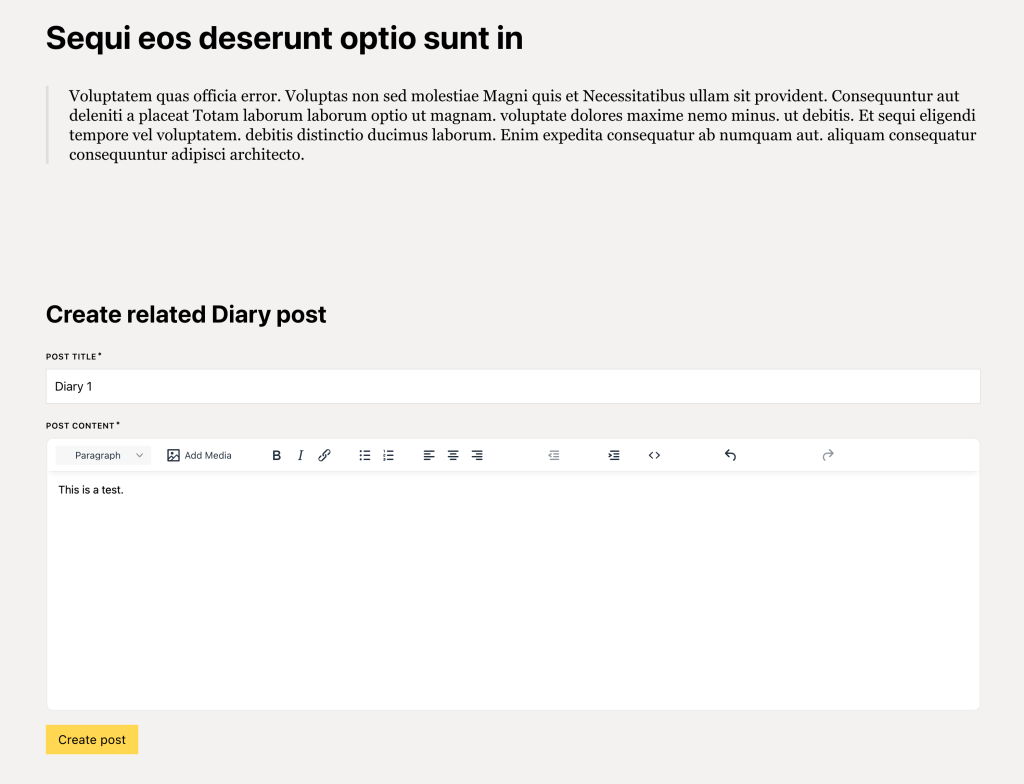
After a user (having appropriate permissions to create posts of diary post type) fills the above form and submits:
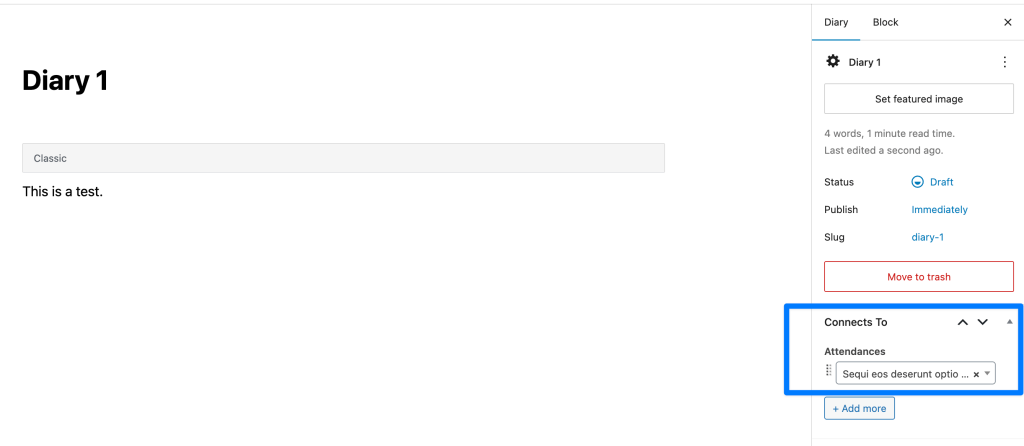
As can be seen, the post on which form has been filled and submitted will automatically be connected to the post that has just been created after implementing this tutorial.

Step 1

Create/edit your single Attendee template.

Add a Form element.

Besides fields for post title and post content, add a hidden field with a value of

{post_id}
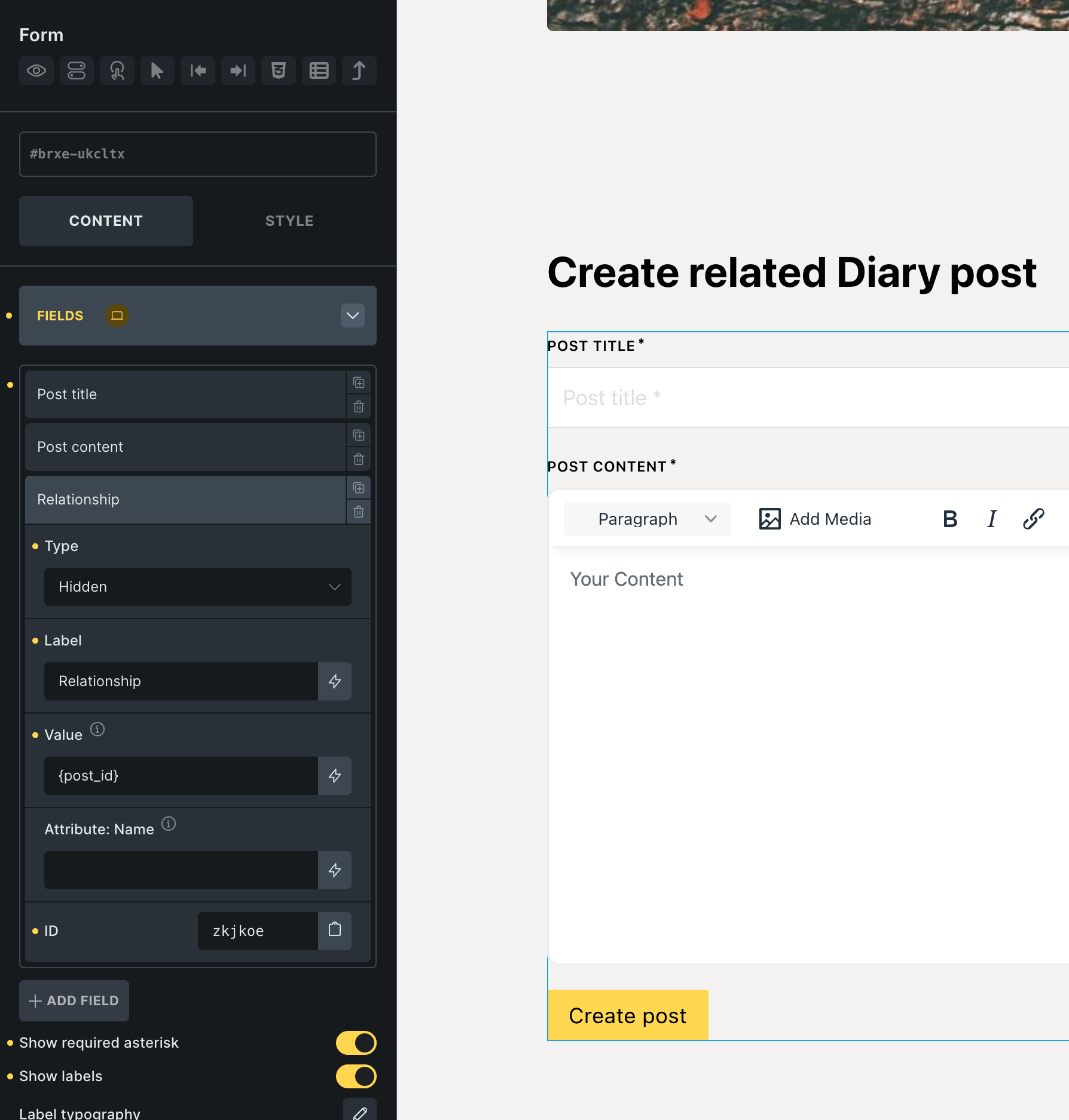
Set form action to: Create post.

Under CREATE POST control group select Diary post type.

Map attendance_post_id post meta to the Relationship field('s value i.e., the current post ID) with Integer sanitization method.

Step 2

Add the following in child theme's functions.php (w/o the opening PHP tag) or a code snippets plugin:

This is a BricksLabs Pro tutorial.

For full access login below or create your BricksLabs Pro account

Get access to all 610 Bricks code tutorials with BricksLabs Pro

Related Tutorials..

Filtering Bricks Posts Query Loop by Meta Box Group’s Radio Subfield Value

Filtering Bricks Posts Query Loop by Meta Box Group’s Radio Subfield Value

In the past we showed how a Bricks posts query loop can be filtered by Meta Box group's subfield of types text/number and Datepicker here.…
Categories:
Color Custom Field as Section Background Color on Category/Term Archives in Bricks

Color Custom Field as Section Background Color on Category/Term Archives in Bricks

How to use a color from a taxonomy term custom field for as the hero section background color on archive pages.
Categories:
Tags:
Pro
Filtering Cloneable Meta Box Group by Sub Field Value in Bricks

Filtering Cloneable Meta Box Group by Sub Field Value in Bricks

This Pro tutorial provides the steps to filter the rows of a Meta Box cloneable group to only those that have a date custom field…
Pro
Filtering posts by a group field’s subfield value with Meta Box when using a custom table in Bricks

Filtering posts by a group field’s subfield value with Meta Box when using a custom table in Bricks

Filtering a query loop to output only those posts with the value of a Select subfield of a Group field set to Yes when using…
Categories:
Tags:
Pro
Bricks Dynamic Data Tag for Text-type Custom Field Value with Word Limit

Bricks Dynamic Data Tag for Text-type Custom Field Value with Word Limit

How to register a new dynamic tag for setting excerpt word limits and outputting an ellipsis (...) at the end.
Categories:
Pro
Dynamically Displaying Connected Content Offer Images in Bricks using Meta Box Relationship

Dynamically Displaying Connected Content Offer Images in Bricks using Meta Box Relationship

Consider the following scenario from a recent project I worked on. CPT 1: project CPT 2: content-offer Taxonomy for Projects: remodel-typeSample term names: Backyard Cottages…
Pro
Bidirectional Relationship between a CPT and a Taxonomy of another CPT using ACF in Bricks

Bidirectional Relationship between a CPT and a Taxonomy of another CPT using ACF in Bricks

A couple of members asked: I have a cpt called "Markets" aand a cpt "tools". Tools have a taxonomy "tools group". How can i create…