11th Dec '24
/
0 comments

Filtering posts by a group field’s subfield value with Meta Box when using a custom table in Bricks

In the comments section of Filtering posts by a group field’s true / false field sub field value with ACF or Meta Box in Bricks tutorial, a member asks:

Do you have a tutorial for how true/false works in a custom database table with metabox?

I use custom database table for faster queries.

Make a select field and and two options YES and NO.

then go to settings tab in the custom field area in metabox and...

enable > "save data in a custom table"enable > "include table prefix"enable > "create table automatically"

Then fill in custom table > "my_product_details"Then fill in custom prefix > "my_prefix_".

Then in bricks go query products and go add add below in meta query:key > mb_product_product_detail_latest_productvalue > 1

"mb_product" references to metabox product post type.Then "product_detail_" is the table prefix.Then "latest_product" is the field ID.

But whatever I do, it doesn't query.

I tried without mb_product. With brackets around it. Nothing works.

This Pro tutorial provides the steps to filter the posts of a Bricks query loop to output only those with the value of a Select subfield of a Group field set to Yes when using a custom table in Meta Box.

Consider this scenario:

Field Group name: Product Fields

Settings: Location is Post type = Product (product)

Product Detail (group type field)|__Latest Product (select type field with Yes and No choices. You may want to set Placeholder to -- Select --)
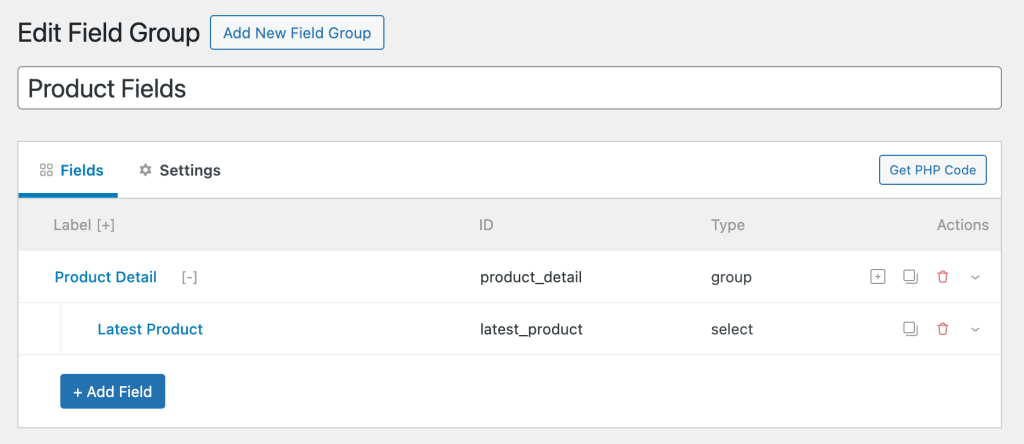
In the Settings tab:

For products titled "WordPress Pennant" and "T-Shirt with Logo":

For other products either the value is set to No or not set.

After implementing the tutorial, output of a query loop:

Step 1

[optional] If you want to output the value of the 'Latest Product' select subfield on single products, add this in a Code element:

This is a BricksLabs Pro tutorial.

For full access login below or create your BricksLabs Pro account

Get access to all 610 Bricks code tutorials with BricksLabs Pro

Related Tutorials..

Pro
Nav Menus Custom Query Types in Bricks

Nav Menus Custom Query Types in Bricks

Updated on 21 Aug 2024 This Pro tutorial shows how custom query types for each navigation menu can be generated in Bricks. This enables us…
Pro
Meta Box Taxonomy Field’s Image Value in Posts

Meta Box Taxonomy Field’s Image Value in Posts

In a project I am currently working on, the requirement is to show the image of an "Image Advanced" type attached to a taxonomy in…
Categories:
Tags:
Pro
Bricks Dynamic Data Tag for Text-type Custom Field Value with Word Limit

Bricks Dynamic Data Tag for Text-type Custom Field Value with Word Limit

How to register a new dynamic tag for setting excerpt word limits and outputting an ellipsis (...) at the end.
Categories:
Pro
Limit the Number of Posts in a Bricks Query Loop of Relationship Type

Limit the Number of Posts in a Bricks Query Loop of Relationship Type

Updated on 12 Dec 2023 Bricks Query Loop popup does not have a control for setting the number of posts to be output when the…
Pro
Meta Box Group’s Number Sub Field Values Sum

Meta Box Group’s Number Sub Field Values Sum

In the Bricks Facebook group a user asked: We can define a custom function that takes a Meta Box group ID, the sub field ID…
Categories:
Tags:
How to create filters with IsotopeJS in Bricks (Part 4): AJAX filter and infinite loops, Sorting, List view and Disable animations

How to create filters with IsotopeJS in Bricks (Part 4): AJAX filter and infinite loops, Sorting, List view and Disable animations

This tutorial will explain how to enable the AJAX filter with an infinite scroll query loop container, how to add a sorting function, how to…
Categories: