
A user asks:
So I managed to build a pop-up that contains some frame slider elements in it.
I’m using jet engine and created a gallery custom field .
I’ll share screenshots shortly but I’m trying to figure out how to display the gallery part .
Has anyone used jet engine, frames and bricks pop-up to show a dynamic popup from a cpt items.
This tutorial provides the steps to show post-specific galleries as sliders using BricksExtras when a “Open Gallery” link is clicked in post cards in a posts grid.
Step 1
Set up a gallery for your post type using a plugin like ACF or Meta Box or JetEngine.
We used JetEngine in our test site for this article.
Step 2
Install BricksExtras and enable these elements:
- Dynamic Lightbox
- Pro Slider
- Pro Slider Control (optional – if you want to have the freedom to place controls like prev/next, progress bar anywhere in the lightbox)
Edit your page/template with Bricks and set up the structure so it looks like this:
Section JSON so you can copy and paste (uses ACSS utility classes).

Image element has been set to show the featured image.
Note
Ensure that the URL has been set for the Text link/Button element that opens the lightbox. You may want to set it to #.
Set a dynamic data condition to make the Open Gallery Link be output only if the gallery for the post in the loop is not empty.

Dynamic Lightbox config:

Set the Link selector to the class of the Open Gallery Link.
For Pro Slider, set Nav arrows to None and enable Gallery mode (under GALLERY control group).
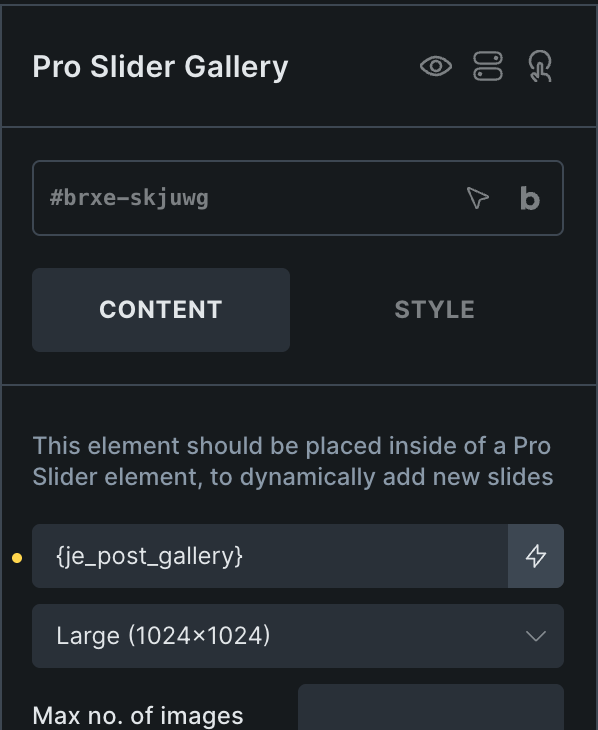
For the Pro Slider Gallery element, select your gallery’s custom field.
Select left and right icons in the Pro Slider Control elements.


